

Overlay plan sheets on map
View plan sets directly on the map to get important context on your projection.
Visualize inspection data
Visualize your inspection data on the map to see where inspections were conducted, identify problem areas on the jobsite and use filters to look at relevant data.
See equipment on the map
Use HCSS Fleet Telematics to find equipment on the map with all available telemetry data and view geofences on your job site.
Custom map layers
Customize your map layers to view satellite data, weather radar and traffic in the area.
See what HCSS can do for you
Schedule a demo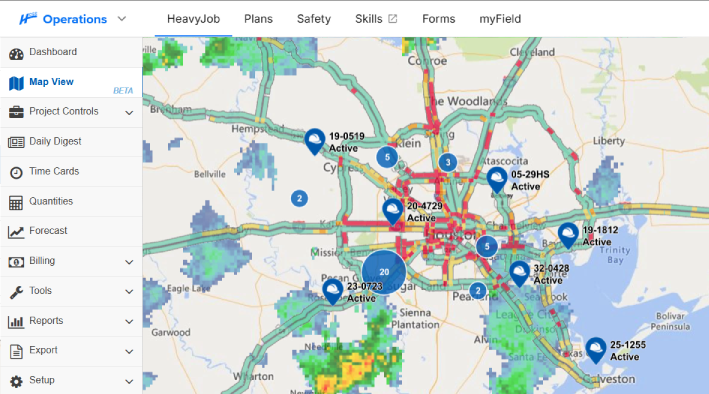
Ask our customers why they trust HeavyJob as their project management tool






It lets me know where projects are and where problems might be.
- Tim Klass, Sigfusson Northern Ltd.
We’re moving away from the DIS and going directly to API, and working with your team has been phenomenal!
- Corwin Fontaine, Allan Myers
95%
of HeavyJob projects close within budget
128,000
active HeavyJob users
9.4/10
average user rating
Always-on support.
Always human.
- Guided implementation to get your team up and running faster.
- Award-winning 24/7/365 support from our Sugar Land, TX office.
- Dedicated Customer Success rep to guide you beyond go-live.
- Ongoing training through HCSS Academy and HCSS community.
See how to collect better field data with less effort and instant insight
Step 1
Share your business headaches
After submitting a demo request form, an HCSS expert will follow up with you by the end of the next business day to discuss your business needs and requirements.
Step 2
See HCSS in action
Then, we’ll walk you through a demo tailored to specific HCSS solutions that can help solve your current business problems.
Step 3
Get up and running in days
Finally, you’ll be assigned a dedicated implementation specialist who will manage your implementation from start to finish and ensure project completion.
Frequently asked questions
What is construction mapping software?
Construction mapping software is a geospatial tool that overlays project data such as blueprints, safety inspections, equipment locations, and more onto a real-time map interface. For heavy civil contractors, it serves as a digital twin of the jobsite, enabling decision-makers to view data in a new context. Look at exactly where work is happening, where assets are located, and where potential site hazards exist, all within a geographic context.
What are the benefits of using Map View in HeavyJob?
The primary benefit of Map View is at-a-glance operational intelligence. Instead of digging through multiple daily reports, managers can see a visual summary of project progress across a massive highway or pipeline. This reduces the information lag between the field and the office. Key benefits include improved equipment utilization, faster response times for site issues, and the ability to verify that work is being performed correctly.
How does Map View integrate with other HCSS tools?
Map View acts as the visual glue for the HCSS ecosystem. It integrates seamlessly by pulling data from multiple sources:
- From HCSS Fleet Telematics: It displays the live location and telemetry data of your fleet.
- From HeavyJob: It pins daily photos, notes, and production quantities to the exact GPS coordinates where they were captured.
- From HeavyJob Docs & Plans: It allows you to overlay your digital blueprints directly onto the map, ensuring your as-built reality matches your as-planned design.
- From HeavyJob Safety: It records inspection locations and allows you to drill in for details.
What project data can I see in Map View?
Map View provides a comprehensive layer of project intelligence, including:
- Asset Locations: Live GPS positions for all heavy equipment and vehicles with HCSS Fleet Telematics.
- Field Documentation: GPS-tagged photos, site observations, and safety inspections.
- Geofences: Virtual boundaries that trigger alerts when equipment enters or leaves a specific zone.
- Production Progress: Visual indicators of completed work segments with the HCSS Docs & Plans overlay.
How does Map View help with jobsite safety and monitoring?
Map View is a critical tool for risk mitigation. Safety managers can use the map to identify “high-risk zones,” such as overhead power lines or underground utilities. The inspection data visualized on the map can be filtered to look for trends and frequent failed inspections to identify problem areas on the job site that need to be addressed.
Can I see my equipment's live location and telematics on the map?
Absolutely. By integrating with HCSS Fleet Telematics, Map View allows you to see the real-time status of your entire fleet. You can see which machines are idling, which are active, and which require immediate maintenance all represented by icons on the map. This allows fleet managers and project managers to optimize movements, reduce fuel waste, and ensure that the right machine is in the right place to meet the day’s production goals.
Didn’t get all of your questions answered?
Request info