
Attach photos to annotations
Easily attach photos to existing annotations and easily view them in the office or the field.
Improve job progress tracking with photos
Add photos and videos with location marker tags to help track job progress at specific areas of the jobsite.
See what HCSS can do for you
Schedule a demo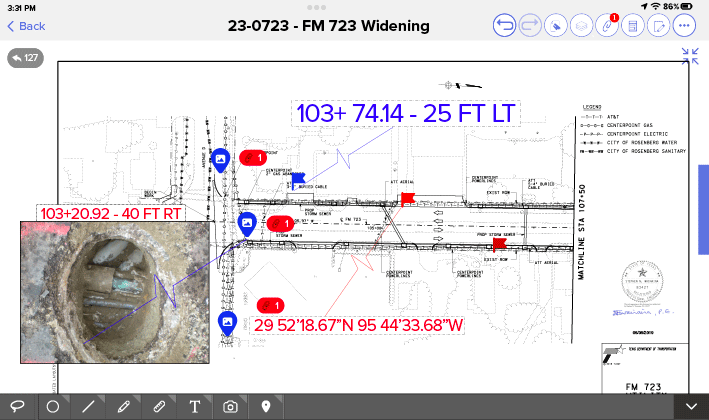
Ask our customers why they trust HeavyJob for construction photo management






Another favorite feature is pictures. I don’t need to go to the problem area – I can see it through the app.
- David Sisson Jr., DXI Construction

This is a fantastic tool for us to communicate with the field and get the most up-to-date information to the guys building these projects.
- Eric Hanson, Precision Directional Boring
91%
of Docs & Plans customers reduce rework
5
hours/month reduced travel time per PM
4.6/5
Apple App Store average rating
Build right the first time, every time
Step 1
Share your business headaches
After submitting a demo request form, an HCSS expert will follow up with you by the end of the next business day to discuss your business needs and requirements.
Step 2
See HCSS in action
Then, we’ll walk you through a demo tailored to specific HCSS solutions that can help solve your current business problems.
Step 3
Get up and running in days
Finally, you’ll be assigned a dedicated implementation specialist who will manage your implementation from start to finish and ensure project completion.
Frequently asked questions
What is construction photo management?
Construction photo management is the process of capturing, organizing, and storing visual data from a jobsite to create a chronological record of project progress. Unlike a standard smartphone gallery, professional photo management software ensures every image is time-stamped and linked to specific locations or tasks. This creates an indisputable visual history that is essential for progress tracking, quality control, and owner reporting.
What are the benefits of HCSS photo documentation software?
HCSS photo documentation software is a professional-grade solution built for the rigors of the field. The primary benefit is the transition from “random snapshots” to structured project intelligence. By using HCSS, contractors ensure that every photo is organized by project, date, and foreman. This high-level organization demonstrates to owners and stakeholders that your firm maintains rigorous standards for documentation and project oversight.
How do field photos protect contractors against claims, disputes, and rework?
A single photo can be worth thousands of dollars in a legal dispute. HCSS protects contractors by providing visual proof of work. If a utility hit occurs, a GPS-tagged photo taken before the incident can prove your crew followed proper marking procedures. Similarly, documenting found conditions (such as unforeseen soil issues) with photos ensures you have the evidence needed to support change orders and prevent unpaid rework.
Can crews capture and tag photos directly to specific daily activities or cost codes?
Yes. This is the organizational power that separates HCSS software from a standard camera roll. Field crews can tag photos directly to specific daily activities or cost codes within the app. This means if you want to see all photos related to “Structural Concrete Pour” for Section 4, you can filter for that cost code and view the entire history in seconds. This level of granularity ensures that visual data is always contextualized within the project’s financial and operational framework.
Can field photos be accessed and uploaded from mobile devices with limited connectivity?
HeavyJob Docs & Plans is built for the remote jobsite. Our mobile app lets crews capture high-quality photos even in areas with no cellular service. These images are saved locally on the device and will automatically sync and upload to the cloud the moment the worker returns to a location with a stable internet or Wi-Fi connection. This ensures that documentation never stops, regardless of how remote the highway or tunnel project may be.
How do field photos integrate with daily diaries and production reports?
Images captured in the field are automatically integrated into daily diaries and production reports in HeavyJob. This allows project managers to see the progress reported by the foreman without leaving the office. This integration provides a complete narrative of the day’s work, combining labor hours, material quantities, and visual evidence into a single, comprehensive report.
Does HCSS software support video capture in addition to static site photos?
Yes. HCSS supports video capture. Video is particularly valuable for documenting complex site operations, such as a major bridge segment lift or a high-speed concrete pour, where a static image might not tell the full story. By supporting video, HCSS ensures that you have the most robust documentation possible for complex site inspections.
Can I annotate or draw on photos after capturing them?
Absolutely. To provide maximum clarity, HeavyJob Docs & Plans allows users to annotate or draw directly on photos after they are captured. Foremen can use digital tools to draw arrows, circle specific defects, or add text boxes to explain exactly what the office should be looking at. This feature turns a simple photo into a detailed site observation, eliminating the guesswork for engineers and ensuring that critical issues are addressed.
Didn’t get all of your questions answered?
Request info