

Streamline inspection notes
Operators, mechanics, and managers can quickly add follow-up inspection notes with photos.
QR code forms
Just scan a QR code with your camera to access the inspection form for any piece of equipment.
Failed item alerts
Get notified immediately when a piece of equipment fails an inspection so they can head to the shop ASAP.
HCSS Field integration
Fully integrated with HCSS Field (Safety) for inspection follow-ups.
See what HCSS can do for you
Schedule a demo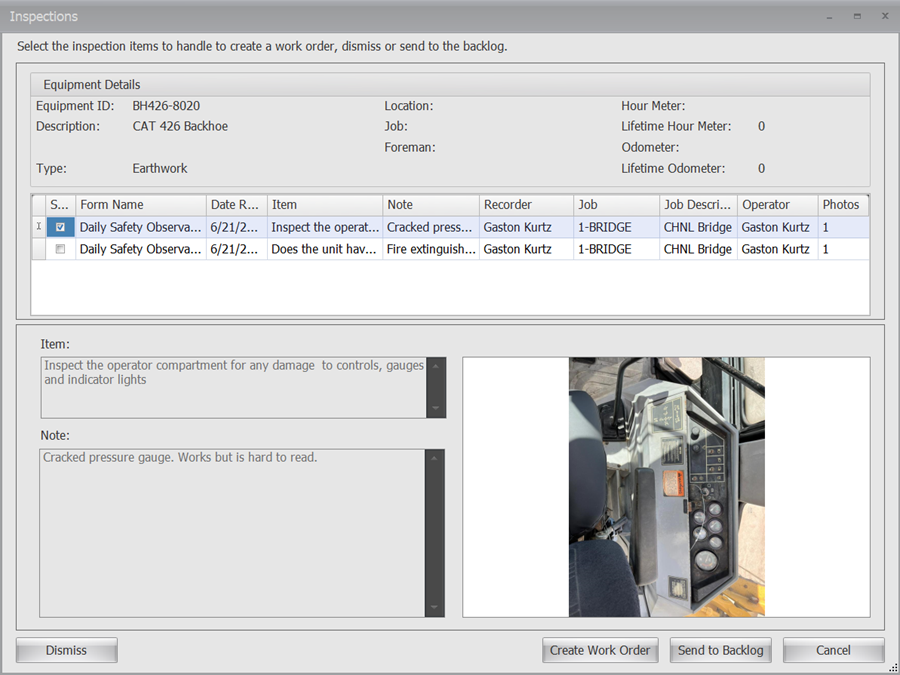
See why our customers trust Equipment360 to conduct, manage, and track equipment inspections for their fleet






It enabled us to move away from independent maintenance software and capture a lot of the processes of trying to collect meter readings or job locations.
- Chris Dixon, DXI Construction
The maintenance schedules we’re able to get ahead of – we’re ahead of the game now.
- Trinidy Fuhrmann, Sierra Nevada Construction
65%
fewer breakdowns for Equipment360 users
10%
reduction in repair work order cost
4.6/5
Apple App Store average rating
Start managing your fleet in real-time and maximize profitability
Step 1
Share your business headaches
After submitting a demo request form, an HCSS expert will follow up with you by the end of the next business day to discuss your business needs and requirements.
Step 2
See HCSS in action
Then, we’ll walk you through a demo tailored to specific HCSS solutions that can help solve your current business problems.
Step 3
Get up and running in days
Finally, you’ll be assigned a dedicated implementation specialist who will manage your implementation from start to finish and ensure project completion.
Frequently asked questions
What is fleet inspection software?
It’s a digital tool that replaces paper forms and spreadsheets. It allows your team to complete, track, and save equipment inspections on a phone or tablet, ensuring every machine is safe and ready to work.
How does it work in the field?
Field crews scan a QR code on the machine to open the right form, fill it out, and attach photos of any issues. It works even without cell service; the data simply syncs once the device is back online.
How does fleet inspection software help with DOT or safety audits?
Fleet inspection software like Equipment 360 keeps all your records, including DVIRs and timestamps, in one digital folder. Instead of digging through truck cabs for lost paperwork, you can pull up a permanent, organized history instantly during an audit.
What happens if a piece of equipment fails an inspection?
If an operator “red-tags” an item, an alert is sent instantly to the shop’s dashboard. The shop foreman can turn that alert into a work order with one click, ensuring the problem is fixed before it causes a breakdown.
How does inspection data connect to maintenance and repairs?
Inspection data connects directly to maintenance workflows, creating a seamless process from issue detection to repair.
With Equipment360, inspection data flows into work orders without manual re-entry, giving mechanics instant access to notes, photos, and issue details so they can diagnose and resolve problems faster—all within a single, connected system.
How does inspection software reduce downtime and costs?
Equipment inspections reduce downtime and costs by catching issues early, before they lead to unexpected failures.
With Equipment360, teams can identify and address problems proactively, helping avoid costly breakdowns, keep equipment running and jobs moving, improve utilization, and extend the lifespan and value of their equipment.
Didn’t get all of your questions answered?
Request info