If you've spent any time in a job trailer, a preconstruction meeting, or an industry conference this year, you've heard people talk about AI for contractors. What you may not have heard much of is what to actually do about it.
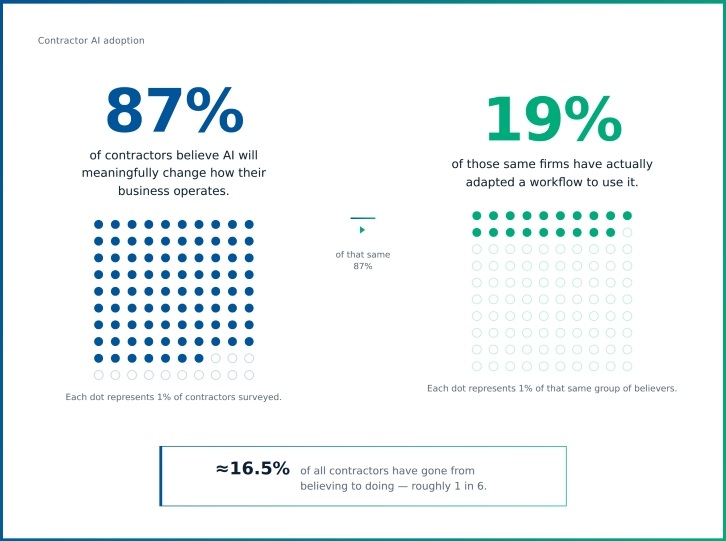
That gap is real, and it's bigger than you might think. According to a report from Dodge Construction Network, 87% of contractors believe AI will meaningfully change how their business operates. Only 19% of those same firms have actually adapted a workflow to use it. That's the gap most contractors are sitting in right now: curious, maybe a little skeptical, and not sure where to start.
The good news is that getting started with AI in construction doesn't require a company-wide strategy or a data science team. The real value of AI is already showing up in the everyday tasks contractors perform: estimating, scheduling, field reporting, safety, and equipment management.
Table of contents
Where AI Already Shows Up in a Normal Week
AI in construction doesn't have to mean anything dramatic. Looking at real AI in construction examples, it tends to show up in the moments where someone is digging for information, double-checking a number, or trying to catch a problem before it gets expensive.
Here are a few construction AI workflows that will probably sound familiar.
Common AI Workflow Examples
Finding information faster: Instead of digging through folders, drives, and old emails to find a spec section or a past estimate, an estimator or PM can ask a plain language question and get pointed to the right document. It's less about replacing judgment and more about not losing an hour to a search.
Making sense of job data that's scattered across systems: Job costs, time cards, equipment hours, and production numbers often live in different places. Pulling them together to answer a simple question (like whether a phase is tracking to budget or a piece of equipment is running over its expected hours) can eat up a surprising amount of a project manager’s week. AI can help surface that answer faster, so the person reviewing it spends time deciding what to do instead of assembling the data by hand.
Catching mistakes before they go out the door: An estimator double-checking quantity takeoffs, unit costs, or line items against historical jobs is a natural place for AI to help. By flagging things that look off, a second set of eyes can take a closer look before a bid goes out.
A Few More Places AI Shows Up
Getting quick answers from dense documents: Contracts, specs, and safety plans are tediously long, and nobody enjoys re-reading them looking for one clause. Being able to ask a document a direct question and get pointed to the relevant section saves real time, especially in the field.
Staying on top of what changed: A daily summary of what moved, along with crew hours, RFIs, safety incidents, and schedule slippage, means a superintendent or PM isn't starting their morning by piecing the report together manually.
None of this requires naming a specific vendor or product: The point isn't which tool does this. It's recognizing these are the kinds of everyday friction points where AI already has something useful to offer in workflows that contractors already run.
Check Your Data Before You Shop for AI Tools
Before evaluating any AI tool, it's worth looking at your data. AI is only as useful as what it has to work with. If your estimates, job costs, and time cards are inconsistent, behind a paywall, disconnected from your ERP, full of duplicates or errors, that makes them hard to trust; an AI tool built on top of that mess won't fix the problem, no matter how polished the demo looked.
This doesn't mean you need a perfect data setup before you start. Being honest about where your data currently lives goes a long way toward figuring out how easy it would be for a tool to actually use it. Here’s a quick gut check: if you asked someone to pull last month's job cost variance across three projects right now, how long would it take, and how confident would you be in the answer? That's roughly the same test an AI tool would face.
Start Small, Measure, Then Expand
Setting out on the journey with construction AI doesn't require a formal pilot program or a long rollout plan. A more realistic approach can start with one workflow, like reviewing quantity takeoffs on bids over a certain size or generating a daily recap of crew hours and safety flags.
Next, pick one small task inside it. Something narrow enough that one person can experiment without needing a sign-off from five departments. The smaller and more specific, the easier it is to tell whether it worked.
Assign an Owner, Not Just a Task
From here, give the test an owner, not just a task. Assigning ownership is the step that most trials skip, and it's usually why they quietly die.
For example, say Bob is testing the takeoff review and Susie is testing the daily crew report. If neither one is actually accountable for finishing the test or reporting back on it, the whole thing fades the moment work gets busy, and work always gets busy. Naming one person per test and having them report back at the end is what keeps the momentum from disappearing.
Try this out for a defined stretch of time (long enough to see a pattern), rather than judging it after a single use.
At the end, evaluate whether or not this saved time or caught something a person missed. Ignore the flash of being impressed by something that feels modern. Time saved and errors caught are two metrics that actually matter. Say an estimator spent 20 fewer minutes per bid, or a takeoff review caught a quantity error before it went out, that's a real result you can point to.
If the test worked, expand it, maybe to a second workflow, or a wider group of people using the same one. But if it didn't, you've lost very little and learned something specific about what didn't fit. In other words, start narrow, name an owner, measure something concrete, and let the results tell you whether to go further. That's really how most contractors getting value out of AI right now got started.
AI Handles Tedious Tasks But Humans Stay in the Loop
Right now, most construction AI works the way the examples above suggest: you ask, it answers, you decide what to do next. That's an assistant model, helpful, but still waiting on you at every step.
The next phase of this technology, industry-wide, is moving toward AI agents that can take on more of the multi-step work themselves: pulling data, drafting something, and flagging an issue before a person reviews it. That shift is worth knowing about. As these capabilities become more common, having clean, connected, trustworthy data will become increasingly important.
That doesn’t remove the need for human review, though. Sign-off stays with the people who understand the job. Whether a tool is answering a question or handling a few steps of a task, someone with construction judgment is still the one deciding whether the output is right and whether to act on it. That doesn't change as the tools get more capable. If anything, it matters more.
Closing the Gap Between AI Interest and Adoption
The contractors who benefit most from AI aren't waiting for a fully formed strategy. They're testing one small thing, seeing what it actually does for them, and building from there. The gap between believing AI matters and actually using it is where most of the industry sits right now.
Once you've got a workflow or two where AI is earning its keep, there’s usually one big question up next: which tool should we actually bring in?