

Stay mobile with the Maintenance Request App
The mobile app works with iOS and Android devices, allowing users to quickly submit, track, and manage maintenance requests from their smartphones or tablets
Upload maintenance photos
Easily upload descriptions and photos to your maintenance request to show the exact problem.
Real-time alerts
Once a request is submitted through the app, shop managers are instantly notified and can then easily create a work order from the alerting field maintenance request in seconds.
See what HCSS can do for you
Schedule a demo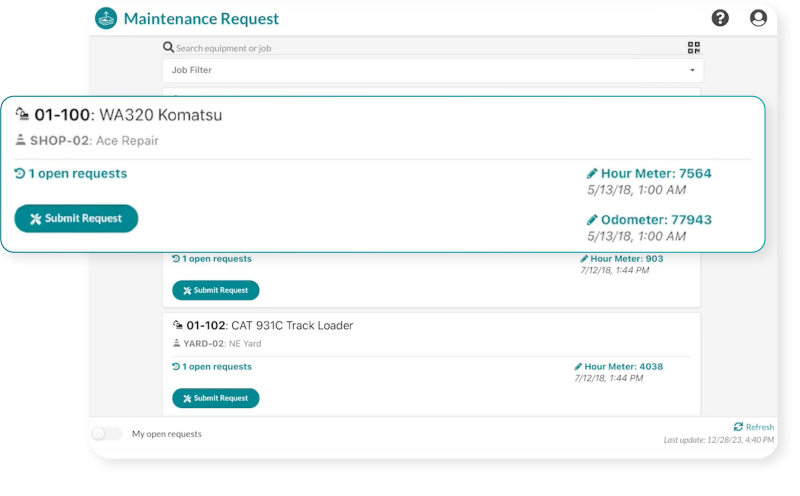
See why our customers trust Equipment360 to help minimize equipment downtime






Being able to track maintenance and where the equipment is at is vital to being able to utilize that equipment to the fullest.
- Hannah Wiertzema, Nabholz Construction
If someone has questions about a work order or the service, I can pull it up almost instantly.
- Tommy Kemp, DXI Construction
65%
fewer breakdowns for Equipment360 users
10%
reduction in repair work order cost
4.4/5
Apple App Store average rating
Always-on support.
Always human.
- Guided implementation to get your team up and running faster.
- Award-winning 24/7/365 support from our Sugar Land, TX office.
- Dedicated Customer Success rep to guide you beyond go-live.
- Ongoing training through HCSS Academy and HCSS community.
Start managing your fleet in real-time and maximize profitability
Step 1
Share your business headaches
After submitting a demo request form, an HCSS expert will follow up with you by the end of the next business day to discuss your business needs and requirements.
Step 2
See HCSS in action
Then, we’ll walk you through a demo tailored to specific HCSS solutions that can help solve your current business problems.
Step 3
Get up and running in days
Finally, you’ll be assigned a dedicated implementation specialist who will manage your implementation from start to finish and ensure project completion.
Frequently asked questions
What is construction maintenance request software?
It’s a digital service ticket system that replaces unstructured communication like phone calls, texts, or scribbled notes. It allows field crews to report issues in a structured way, moving requests directly from the jobsite to the shop to ensure no repair is overlooked or delayed.
How does the workflow work from field to shop?
Field users select the equipment in their app, describe the problem, and attach photos for visual context. These requests flow instantly into the shop’s dashboard, where a foreman can convert them into a work order with one click, giving mechanics all the info they need before they start the repair.
Who can submit a maintenance request?
Anyone working near the equipment including operators, foremen, or superintendents. Using the HeavyJob (formerly HCSS Field) app or a simple web link, users can report leaks or strange noises the moment they happen without needing any special technical training.
What happens once a request is submitted?
The request appears immediately in the Equipment360 “alerts view.” This bridges the gap between the field and the shop, allowing the foreman to see who reported the issue and when. By turning the request into a work order instantly, you ensure the repair is tracked and never lost in a paper trail.
How does this help reduce equipment downtime?
It enables proactive repairs. By reporting minor issues like frayed hoses or slow leaks early, the shop can order parts and schedule service during planned downtime. This prevents “small” problems from turning into catastrophic failures that bring the entire jobsite to a halt.
How does it connect to the rest of my HCSS software?
Because it’s a unified platform, field requests convert into work orders with zero manual data re-entry. This data automatically updates the machine’s full repair history, giving management the accurate “Total Cost of Ownership” data needed for smart repair-versus-replace decisions.
Didn’t get all of your questions answered?
Request info