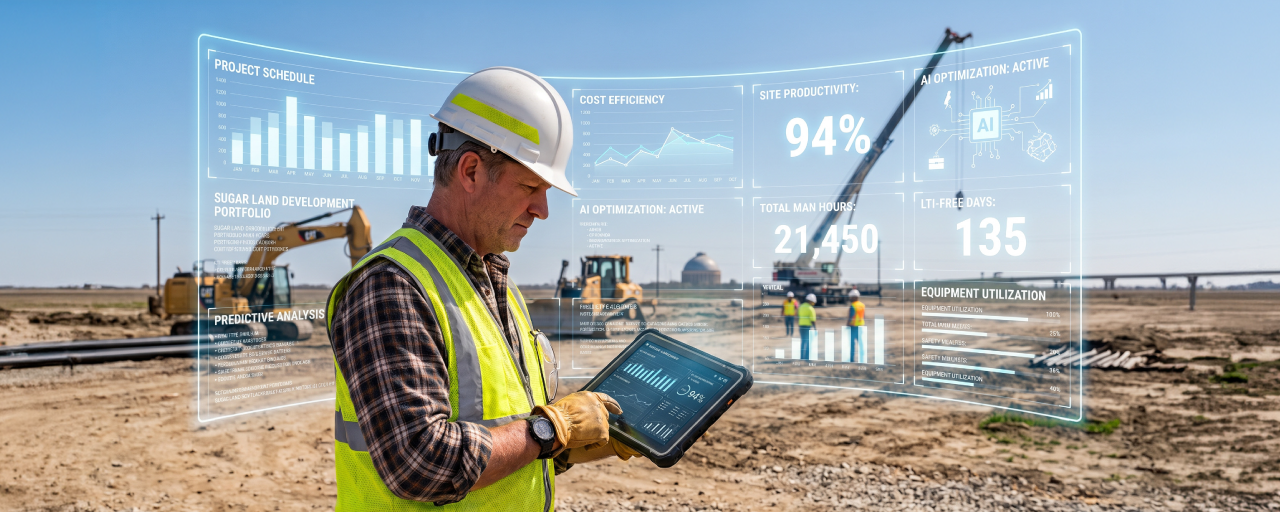
As of 2026, AI in construction has quietly crossed a line. It's no longer the thing a few forward-leaning contractors are piloting in a corner of the estimating department. It's becoming the baseline: assistants that answer questions in plain language, and now agents that take real steps on your behalf.
That puts most contractors in an awkward spot. The upside is undeniable: faster bids, fewer missed line items, and hours handed back to estimators, project managers, and foremen who have better things to do than retype yesterday's logs. On the other side is reasonable cause for hesitation. The numbers these tools touch are the same numbers you bid, bill, and get paid on, so being cautious is simply good business.
However, completing every job on time and within budget is always the most important part. A lot of the AI conversation still defaults to the bid, but the same questions apply on the jobsite and in the shop. For estimating, field operations, equipment/fleet, and reporting, AI now spans it all.
Remember, though: every construction AI vendor promises faster work. The real question is whether you can trust what it produces. To scale safely, contractors need a way to tell superficial automation from AI they can actually rely on, and that’s exactly what the five questions below are for. Speed is easy to demo, but genuine trust is what protects your margins.
Table of contents
- The 5 Questions to Ask Before Buying Construction AI
- What to Avoid: Common Mistakes Contractors Make When Evaluating AI Solutions
- Construction AI Evaluation Checklist
- What AI Looks Like Today for Civil and Infrastructure
- Where AI Tools Are Headed
- AI That Gives Contractors a Real Advantage
- Frequently Asked Questions
- How is AI used in construction?
- What are the key AI features in construction management software?
- What's the difference between an AI assistant and an AI agent?
- What should contractors look for in construction AI software?
- Do we need a data cleanup project before adopting AI?
- Is it safe to use AI with sensitive construction data?
The 5 Questions to Ask Before Buying Construction AI
1. What data is this built on?
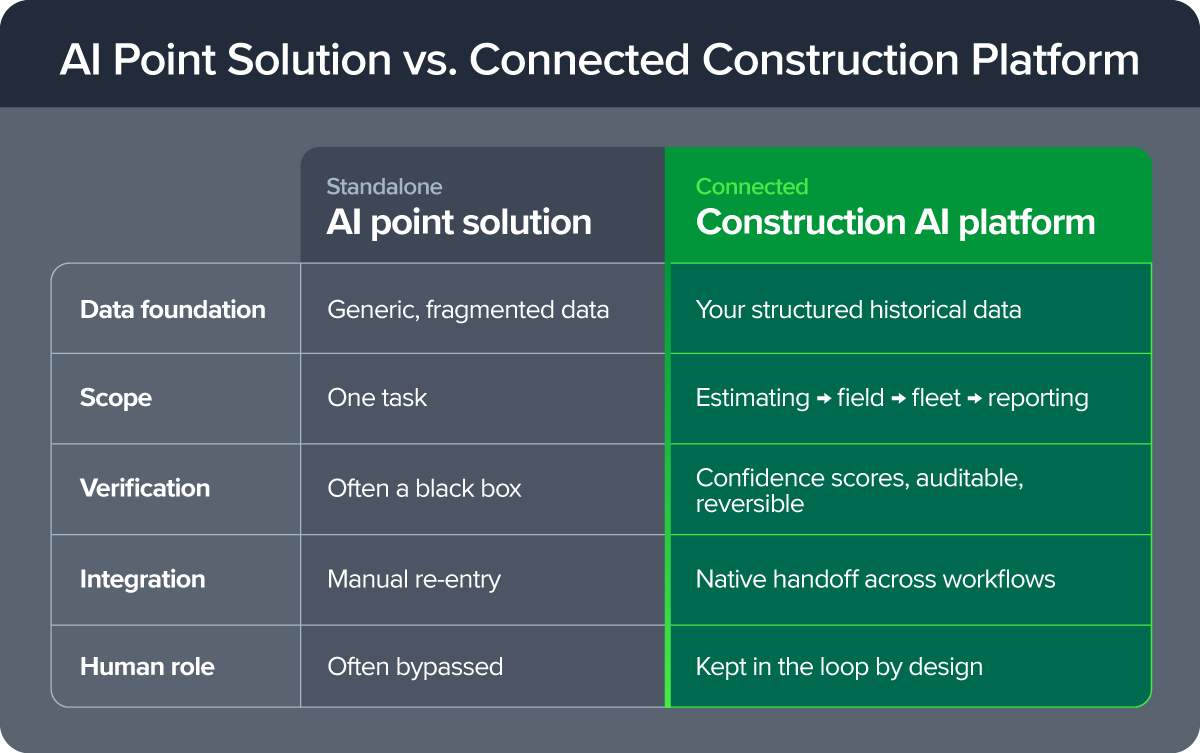
AI only gets smarter by learning from years of your own structured operational data, so the most important question is also the least glamorous: where does the data behind this tool actually come from, and how long has it been accumulating? The strongest answer is rich estimating, operations, and fleet data connected across your entire project lifecycle, not a single slice of it. A tool trained on generic or thin data gives you generic, thin answers, dressed up in confident language.
This isn't a niche concern either. In the Royal Institution of Chartered Surveyors (RICS) 2025 survey of more than 2,200 construction professionals worldwide, poor data quality was named as a real barrier to adopting AI on the job.
That confirms what experienced contractors already know: the model matters less than the data you feed it.
2. Can you verify and reverse what it does?
A mistake inside an AI tool doesn't stay inside the AI tool. That mistake flows straight into a bid, an invoice, or a payroll run, and as these tools move from answering questions to taking multi-step action on their own, this matters more, not less. Ask to see the work: does the tool show its reasoning, surface a confidence level rather than a flat answer, and let a person review, override, or roll back what it did? If the honest answer is simply instructions to trust the output, that's not a feature, it's an exposure.
3. Does it connect your workflows or create another silo?
Plenty of tools do one thing well, such as a takeoff, dispatch, or safety checklist. But if that tool can't connect to job costing or scheduling, it isn't saving anyone time. It's just relocating the busywork to whoever now has to move the data by hand. The test is simple: after the AI tool does its part, does the output flow natively into the next stage of the job, or does somebody have to re-key it into the next app and call that progress?
4. Does it understand civil and infrastructure complexity, from bid day to project completion?
A generic model can read a spec sheet. Whether it understands equipment operating expenses, multi-tier union labor, prevailing wage, and complex DOT pay items is a different question entirely. Those are the details that decide whether a job makes money. It's easy for a tool to extract quantities in minutes and look brilliant doing it.
However, it's much harder for a tool to know that those quantities carry localized cost. A generic model will quietly skip right over the risk.
5. Does it make your experts faster, or try to replace them?
Watch closely for what a digital tool is trying to do at the finish line. Is it attempting to complete the entire job for you? Or does it deliberately leave the final, highest-value decisions (such as the pricing strategy, the competitive read, and the judgment call that can win or lose the bid) to an experienced person?
The best AI tools aim to get a task roughly 90% of the way there and stop, on purpose. The last 10% is where the judgment lives, and judgment is what you're paying your best people for.
What to Avoid: Common Mistakes Contractors Make When Evaluating AI Solutions
Chasing speed over accuracy: Speed is the easiest thing to demo and the easiest thing to fall for. But a faster wrong answer is still wrong, and in construction, a wrong assumption doesn't stay abstract. It becomes a real bid or a real budget problem, usually discovered too late to fix cheaply.
Counting agents instead of evaluating them: A vendor that ships a long menu with dozens of agents at launch isn't necessarily ahead of one that ships a handful built on real workflows. Shallow agents tend to be hollow and brittle: impressive in a demo, quick to fall apart the first time real job data runs through them. Ask what each agent is actually grounded in, not how many there are.
Trusting outputs, or autonomous actions, from tools that can't show their work: Without visible reasoning or a confidence score, you have no way to catch a mistake before it costs something. Assuming it’s usually right is not a standard you would accept from a new estimator, and it shouldn't be the standard for software that touches the same numbers.
Bolting on point solutions that never talk to job costing or scheduling: A tool that solves one task in isolation feels productive in the demo and quietly creates work in production. Every disconnected app is another place data has to be moved by hand, and another place it can go wrong.
Mistaking fast onboarding for deep readiness: Getting live quickly is genuinely valuable, and strong onboarding support matters enormously for change management and adoption. But getting up and running in a week is not the same claim as knowing there are years of structured data behind every answer the tool gives you. Speed to launch and depth of foundation are two different things, yet vendors sometimes hope you'll confuse them.
Construction AI Evaluation Checklist
Whatever demo you book, bring this along. Every row maps back to something that shows up later in a bid, a budget, or a payroll run.
| Question | What to Look For |
|---|---|
| What data is it built on? | Is it clean, structured, connected project data, or fragmented information scattered across systems and silos? |
| Can you verify its work? | Does it explain its recommendations, show confidence levels, and let you review or override the output? |
| Is it purpose-built for your work? | Does it handle heavy civil complexities like DOT pay items, prevailing wage, multi-tier union labor, and equipment operating costs, or is it a generic tool adapted to fit? |
| Does it connect your workflows? | Does it work across estimating, field ops, fleet, and accounting, or does it add another disconnected app? |
| How does it protect your data? | Does it respect your existing permissions, keep your data isolated, and avoid using it to train models for other companies? |
| How much construction expertise does the vendor have? | Ask for customer references and years of trusted partnership with real civil and infrastructure companies. |
| What kind of support is available? | Can you reach real construction experts 24/7/365, or are you limited to chatbots and ticket queues? |
| What's left for people to decide? | The best AI makes experienced teams faster. It doesn't replace their judgment. |
What AI Looks Like Today for Civil and Infrastructure
So what does an AI tool that can actually answer Question #1 look like in practice?
For HCSS, the honest answer to "What data is this built on?" is four decades in the making. HCSS didn't take a generalized AI tool and retrofit it for construction. From the start, the software was built specifically for the complexity of heavy civil and infrastructure work. The AI is working from structured operational data that's been accumulating for 40 years, not a generic model hoping the jobsite looks like everything else it's seen.
That foundation is what makes otherwise ordinary-sounding features possible. Two quick examples:
- Job Data Analysis lets a team ask plain-language questions of live HeavyJob data, budget performance, a variance chart, and get an answer back. You can't query a mess. This only works because the underlying data is already structured and connected.
- Estimate Audit Summaries give you a tracked history of changes to a HeavyBid estimate, which is the direct result of there being decades of estimate data to audit in the first place.
This is just a snapshot of what's available. For a more in-depth picture of current capabilities and what is to come, check out the HCSS AI page.
Where AI Tools Are Headed
The bigger shift underway is the move from assistants (which deliver insights) to agents, which take multi-step action. This isn't a roadmap promise either. Real agents are already in motion. What matters is the discipline behind them. Each HCSS agent is built on three guiding principles: it has to solve a genuine pain point rather than chase a trend; a human always makes the final call; and every agent follows the platform's existing role-based permissions, with your data never shared or used to train models for other companies.
Three agents show what that looks like, and in each case, the pain point explains the why:
Estimate Builder Agent (HeavyBid)
Even inside HeavyBid, estimators were still burning time on repetitive data entry instead of analyzing risk and refining pricing strategy. This agent drafts an estimate from historical data and company libraries, then hands it back to the estimator to finish.
Production Analyst Agent (HeavyJob)
Even with budget and actuals already tracked, variances between them were still getting caught too late, and costs ran away. This agent flags cost-code variances and explains what's driving them, leaving the PM to decide what to do.
Field Agent (HeavyJob)
Even with digital time cards and daily logs, foremen still didn't want to type out reports after a full day on-site, which led to inaccurate data and human error. This agent drafts a daily report from a spoken description of the day, for the foreman to review before it's submitted.
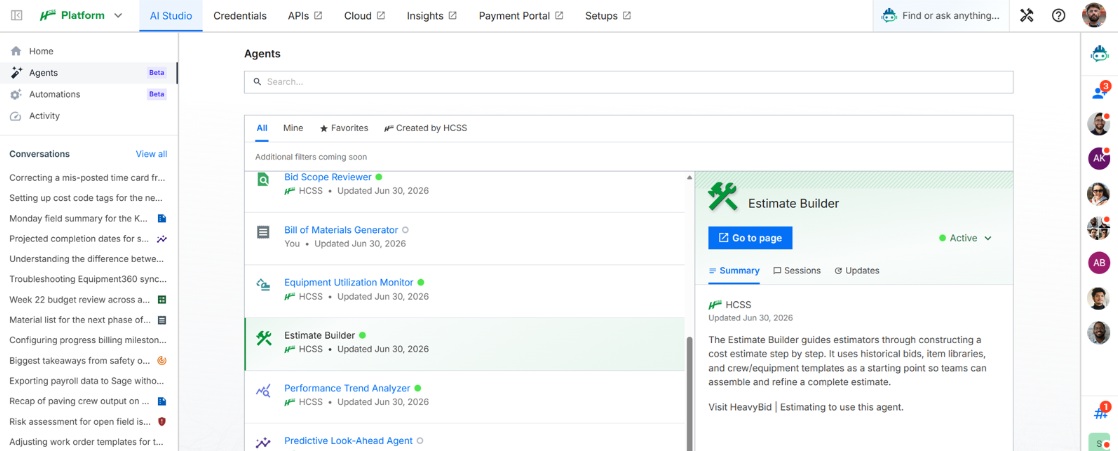
HCSS AI Studio extends that same principle to how the agents are configured: tunable settings and added company context, not a fixed black box you're stuck with. It's about making the agents fit your operation, within guardrails.
And notice the common thread across all three. Every one of them surfaces confidence, not certainty, and someone accountable still makes the final call. As AI takes on more action, that human checkpoint gets more important, not less.
AI That Gives Contractors a Real Advantage
Done right, AI is a huge advantage over competitors, helping with faster bids, fewer missed costs, and freeing teams from repetitive work so they can focus on what matters most. But that's only true when it's backed by verifiable data you can trust, connected workflows that don't relocate the busywork, and a human who stays in control of the decisions that matter.
The proof is in who's already betting on it. 43 of the ENR Top 50 heavy civil contractors trust HCSS to bid, build, and deliver with confidence.
Ready to see what construction-grade AI looks like? Request a demo.
Frequently Asked Questions
How is AI used in construction?
AI now spans the full project lifecycle: accelerating estimating and takeoff, surfacing variances during field operations, supporting fleet and equipment decisions, and streamlining reporting. The strongest applications amplify experienced teams rather than replace their judgment.
What are the key AI features in construction management software?
Today's most useful features let teams query live job data in plain language, audit changes to estimates, and flag budget-to-actual variances early. Emerging agent features can draft estimates, analyze budgets, and generate daily field reports, always leaving the final decision to a person.
What's the difference between an AI assistant and an AI agent?
An assistant delivers insights for a person to act on. An agent takes multi-step action on your behalf, such as drafting an estimate or a daily report. Because agents act rather than advise, verification, permissions, and human sign-off matter even more with them.
What should contractors look for in construction AI software?
Look past the speed of the demo to the foundation: the quality and structure of the data behind the tool, whether it shows its work and lets you verify or reverse output, whether it connects across estimating, field, fleet, and accounting instead of creating another silo, and whether it understands heavy civil realities like DOT pay items and prevailing wage. Above all, confirm it keeps a human in control of the final decision.
Do we need a data cleanup project before adopting AI?
Not necessarily, and this is where a connected platform helps. A tool built on a platform that has already organized your estimating, field, and cost data gives you a head start; a standalone tool bolted onto fragmented spreadsheets can't.
Is it safe to use AI with sensitive construction data?
It can be, provided the tool is built for it. The key safeguards: keeping your data isolated, respecting your existing role-based permissions, and never using your data to train models for other companies.