Looks like we are here at the top of the hour. My name is Reed Renfrow. I'm the product marketing manager here at HCSS for our operations products, and I help run the product marketing team.
We're excited about to talk to you about some of the upcoming releases and items we have that are going be new coming this spring.
First thing I do want to note, the release date for almost everything you see here is April sixteenth, so it's a week from now, next Thursday.
There's a few things that might have a different date. We'll make sure we note those, but just know you're not going to see these things inside of of the products today, but we will have these coming in just about one week. So I wanted to give you a quick preview.
As a reminder, if you do have any questions at any time throughout the presentation today, please use the Q and A button. Go ahead and put that question in. We might have a little bit of time for a few live questions, but we have a number of people here on the presentation and also backstage that will go in and answer those questions for you. So anything that you have that we're talking about that isn't clear to you, you have questions about use that Q and A feature. It helps us stay organized and make sure that we get all of your questions answered here.
Before we kick off, I do want to plug our Consulting Connect. This is a great opportunity to work with our professional services teams. They're holding events throughout the year. We've already had some in different places throughout the country, so you are close to any of those locations.
Scan that QR code. You can go. It's a great way to learn more about our products, work with some of the experts that truly know every detail of how these products work and help customers every day get more out of their HCSS products. So if if if you see a city near you coming up, go ahead and scan that.
You can get signed up. We'll have more information there as well.
Alright, And with that, I'm going to turn this over to Aaron Allhouse. He's gonna take you through the spring release for heavy bid. So, Aaron, take it away.
Alright. Thank you for that. Everybody, welcome to the spring release webinar. I'm going to chat to you about heavy bid, pre-con quotes, everything that we've been up to over the last several months.
So with that being said, the first item that I want to take a look at is importexport company codes. So in the contacts module, previously, one of the things that we had was we just had an import for the company name, and we would autofill the company code. We got a lot of requests from our end users wanting the ability to have more granular control over how that company code is established. That would work better with a lot of customers' ERP systems and any additional contact databases they have.
So that's essentially exactly what we have given you is the ability to also import that company code. It also is part of the export process as well.
Moving over to the world of HeavyBid, we've made a lot of additional changes. The first one is integrating with HeavyJob. This is a really big story on our part.
In in this instance, we are no longer working with with an XML file or an intermediate file. We are writing directly into the heavy job database, and that does several things. It creates a live link. So you'll see right at the very top of that GIF, we have a timestamp of when when that handoff was performed.
We also can jump right into that job. So if the user that creates that job has permissions into the world of HeavyJob, they can jump directly into the job and access the database versus having to open up another tab and navigate into HeavyJob. We're trying to make that process easier. And you'll see that as the overarching theme for HeavyBid all around.
It's reducing keystrokes. It's reducing the time to get things done. It's trying to make everything slightly more efficient.
And, in along with that efficiency is we wanna give you the ability to use your past projects. The items that you have already built, we're giving you the ability to use those moving forward. So we brought in the copy previous functionality. That copy previous functionality allows you to reference your past estimates.
If you know what the estimate code is, you can navigate directly to it. If you know what the description is, you can search by the description. But what about in the instance when you don't know the estimate code or the description? This was an item I did six months ago.
I know what I did, but I don't remember what the estimate was. Well, we give you a deep search.
That search references both the code and the description where I can look at pay items, WBS, activities, and resource level of detail. I can find what it is I wanted and then load that estimate up and copy what I need directly into my bid. Again, making that process as seamless and frustration free as possible.
Again, trying to make processes seamless. Within the library's function, we instituted a search. So taking a look at the activity library as an example. The activity library can be several thousand items long. We have customers with databases of three thousand, four five thousand plus activities. Having to scroll and navigate to the item that you're looking for can be a very time consuming process.
Having a search allowing you to search by the code or the description and navigate directly to that is a huge time saver, especially as you're going in and modifying your assemblies, bringing in additional activities or modifying or I'm sorry, bringing in additional crews, modifying those crews or bringing in some other resources, non crew resources into that, making this whole process that much faster.
Now, I'm especially excited about this one. It is HeavyBid's first stab at AI. And what better place to do that than trying to bring AI into your audit trail? So for anyone unfamiliar with the audit trail, the audit trail is essentially quick tracking of your estimate. It shows you all of the changes that have been made in your estimate over a given over the lifespan of the estimate.
When you're going in and trying to review that, the list can be daunting, for trying to make heads or tails of all of the changes that are made. So we're giving you the ability to summarize your audit trail based on hour, based on day, based on the week, or if it's a really long project, potentially by the month and giving you a summary view. You can then use the flashback tool that's built right into HeavyBid and navigate to that point in time in the estimate. Again, saving you time and saving you headache and finding what it is that you are looking for.
Yes, there should be an article already published on the direct connection between heavy bid and heavy job.
Now moving over to the world of quotes, we've done a complete revamp of the main page of quotes. We are now giving you a quotes dashboard. That quotes dashboard does several things. It's gonna give you the ability to essentially see everything based on the status of the quote folder.
What I mean by that is, is it is the quote folder created? Is it in progress of getting quotes? Have I made my solicitations? Have I got my quoted prices and now I'm reviewing them?
Are the items selected but not updated? Or is this quote folder done? I've applied my prices to my bid, and I can move it over to the done column. We make the transition from status to status very seamless.
It's just a simple click and drag. I can drag it from one status to the other.
Looking at these projects, I can view simply by the project, or I can group everything by the status. So if I want to see across all of my projects, everything that's in a a to do status, basically everything that's been created, but I haven't moved forward with it. I can review all of that very, very easily.
Again, one one bird's eye view of everything that is in a current needed to do status, saving me time of having to jump between my different projects in order to see that information.
Now diving directly into the quote folder, we brought in quote folder attachments.
This is actually really, really cool because we have version history built right into it. As you're going through and you're adding your attachments, not only can you preview them without having to download them again, but you can also store your history on those those particular files. So if I get an updated quote from a vendor, I can update that particular file. You don't lose the history. We keep it directly in the background. So you're always going to see the most recent version, but I can still download any of those previous versions and compare them whenever I want.
Back into the world of heavy bid, or back in the estimating side of things, taking feedback directly from end users. End users want as much granular control over the cost of their estimate as they can possibly get.
Doing so, we've made some add ons improvements. Beforehand, we had add ons that were taking the total cost of the estimate.
Well, we want total cost without any of our add on costs. So we give you the ability to have in the includes entire estimate without add on, or I want to be able to take my proposal cost, none of my non direct or my indirect costs. So again, we added that includes option for the direct, again, giving you that additional bit of granular control.
Now, one bit of overwhelming feedback we got from end users is I want more display columns in my bid pricing screen. So we have done exactly that.
We are giving you the quantity, we're giving you the unit, we're giving you direct and indirect costs, we're giving you those direct and indirects on the unit, as well as our markup percent on each individual pay item, allowing you to see exactly where all of your costs are being allocated and how that price came to be.
Alright.
Ladies and gentlemen, that is what we have for for HeavyBid for for the the spring release. With that being said, I'm gonna turn it over to, HeavyJob, and they're gonna show you what they've been working on.
Hello, everyone. John Bradshaw. I'll be starting this off here.
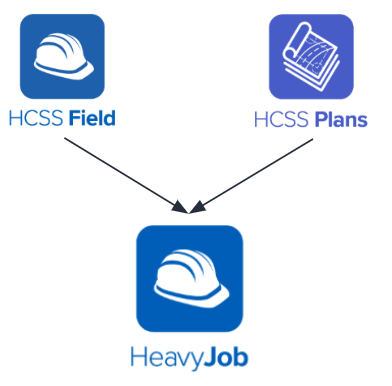
First thing, very excited to announce this one. Docs and plans is gonna be integrated into HeavyJob Mobile.
So this means that that standalone plans app is no longer is no longer needed. Your your foreman, your field supervisors who are using who are using HeavyJob who are using HeavyJob Mobile are going to be able to just when they act when they tap that plans tab there, it just opens the opens plans directly in the directly in the application.
So no more switching. Going to be able to access that job cost tracking documents and all of that all of information from a single app. And then you might have noticed I was referring to it as heavy job mobile. HCSS field is now heavy job mobile, will be heavy job mobile.
In addition, we have added the punch list feature that we we released around UGM is now also available for hybrid customers.
So that those customers who are still using a heavy job desktop, the punch list feature is now available for you. And when you assign a punch list item to a to a person, they will receive a text message notification saying, hey, Hugh, we've been assigned. You've been assigned to this you've been assigned to complete this item.
And I'm gonna give it over to my friend Gaston to talk about safety.
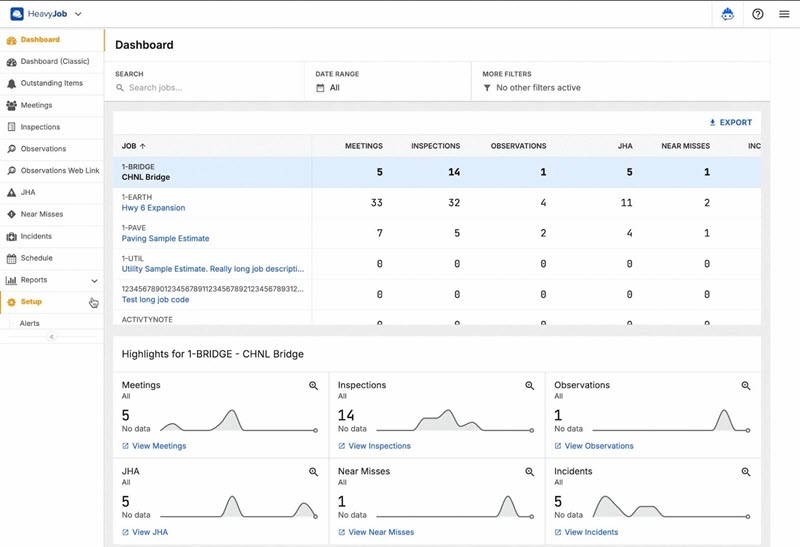
Alright. Thanks, John. So, yep, I'm Gaston from the safety team to talk about just a couple of things that are coming for JHAs that I'm pretty excited about. So, the first one is what we're calling JHA field layouts.
One of the things that we've heard more and more lately is that the JHA module and HCSS safety just doesn't always match the the terminology that your crews are actually using whenever they're working and or maybe even not even the the workflow and the order in which you want them to fill out parts of the JHA or to work through parts of the JHA. And we found this to be especially true whenever some of you guys have told us about your experiments with different hazard mitigation, like systems of thought and things like that. So the and also whenever you're working with certain clients where the terms might not match up.
So the goal of field layouts is to fix that. It's to allow your safety admins to rename rename any major section of the JHA form, hide sections that don't apply to your business, and then you can reorder them to match however you want your people to actually work out in the field. So whenever you go in and set up one of these layouts, they're gonna automatically flow out to all of your business units. You're not gonna have to go into every business unit one by one and make copies of them and all all of those things.
Set it once and then it'll flow out everywhere.
And then as soon as they refresh out in the field, your crews are gonna be able to see those new terminologies and new workflows for the JHA right away.
So this one right is one that Reed mentioned. There are a couple of exceptions to our April sixteenth rule. We're actually gonna be releasing this one April twenty third, which should be when our next HCSS field release goes out. So that's a little bit subject to Apple approval and the timelines of that because Apple has to review all of those before they go out. But April twenty third is our targeted release date for this piece of it.
And then next, also another JHA thing. So we're actually taking where what were previously three separate pages in our JHA setup menu, and we're gonna consolidate them into a single page called the JHA section library. And so this terminology will now match up with the way we're describing sections in the field layouts, which are just the main sections of that JHA form. And so you can go edit the section contents here. We try to add a few visual improvements while we were here, like some badges that show things on additional assessments, like which ones have copy previous, which ones are applied to all JHA, that sort of thing. That way, don't have to open each one one by one to figure out what that's all about.
And this is also going to help lay the groundwork, if you can imagine a little bit here, for us letting you create some additional sections in here to capture types of things that maybe are a little more customized to you.
So be on the lookout for more information about what we're planning for that here coming up here pretty soon, but that that's kinda what we're laying the groundwork for with that. Oh, and by the way, as you change names so if you go into your field layouts and you change the name of one of these sections, so you change primary hazards to sticky stuff that can kill you, something like that, then it will also change here in the section library. It's gonna change throughout the system whenever you do that.
Oh, and a side note, we mentioned, I think, on our last webinar that we were doing the giving you the ability to rename your JHA module altogether. Maybe you don't wanna call it JHA. You wanna call it tailboard or prejob briefing or something like that. And we've had that in beta for a couple of months now. So that should be all done. Everything is looking really good, and we'll be taking that out of beta and making that available to everyone during our April sixteenth release.
And I think that wraps it up for me.
Oh, let's see. I see Mike asked a question. He said, can the signature section of the JHA be be removed with this update? And the answer is yes. Let me or we can go back to the slide here. There's gonna be a section. Sorry, it's a GIF, so I can't really pause it, I don't think, but there, right there, it's showing that you can inactivate the signature section and it'll drop off out in the mobile app so that you can make sure that they're signing the meeting instead of the JHA itself.
No more questions. I think we're good to move on.
Okay. Wonderful. So before I resume showing slides, I'm going to go ahead and answer Alan and John's questions from the Q and A because they are they are broadly similar. Plans app is there is there isn't a sunset plan for the Plans app. It's going to continue continue receiving continue receiving updates. Then for that, you know, for the plans only customer it will still be it'll still be available for the foreseeable future.
And moving on. We're adding the ability to be able to import and export job specific job specific tags. That that job level transaction tag, import and export, be able to manage them in bulk via Excel.
Definitely a definitely a time saver for those for for those of y'all who are extensively who are using job level tags extensively.
I'm personally very excited about a very excited about this one because it's been a been a been long time request. Heard about it at a couple of UGMs.
But we are allow we we're going to be able we we are enabling the uploading of KMZ and KML files into into MapView in HeavyJob. So you'll be able to take those take those those geo located line drawings and be able to add them to your add them to your map for that for for that job.
Provide a lot more provide a lot more context, provide a lot more information of what's what's happening inside of HeavyJob. And then also for those who have been wanting to see your drone imagery included in the maps in in in HeavyJob, We're going to be we're going to be able to bring in WMTS, is a web map web map tiling service.
So if your drone if your drone if your image providing service has a WMT service available, you'll be able to use that to display those drone images as part of the heavy job map.
Editable grids and equipment cost types. So be able to able to edit the rate set, the accounting the the the rate set, cost adjustments, job level fields are going to now be inline editable.
Fewer clicks, faster data man faster data management with more granular control over how how equipment costs are going to be tracked and categorized and tracked.
We have some external API endpoints for DIG permits. So if this is if this is something you've been you've been looking you've been looking for, you wanna manage your you wanna you you want to you you wanna use some other tools to be able to manage your manage your DIG permits, we can go ahead and integrate those DIG permit work workflows with with third party systems. Definitely something you might want to check out over in HCSS marketplace.
Then being able to pull in my field hours into the web time card. So just be able to pull in my field hours directly into web time card. Process is going to work for both new and revised time cards. Gonna help hopefully streamline your payroll processing. And if you would like to be a part of the beta testing for this, please reach out to my reach out to my friend who wasn't able to make it here today. The other John, Jon Knudson, Jonathan Knudson at hcss.com. He'd love to have as many people as possible check this out, beat it up, tell them tell them what's good, tell them what's not so that when so that when this officially releases, it's going to be exactly what you want and need.
And I'm gonna give this over to whoever is up next.
Thanks, John. I'll take this. Alright. So as we mentioned earlier, the field app will be renaming to Heavy Job.
So in the screenshot, it says field, but whenever the release comes out, it will be renamed to heavy job. So just to make sure that's clear. So whenever you open it up, it will say heavy job, but the crew module is now available for Android. So we mentioned this in one of our previous webinars.
This is where field enter the field interacts with heavy Resource Planner. So this is where your foreman will be able to see their daily scheduled employees and equipment. So as you can see here, this is the phone view. If you click on the crew module here, you will see the daily view for the foreman, for his crew, whoever's been assigned to him, long as well as the linked equipment for those employees.
We are also able to pull in crew into the time card. So anybody who has been scheduled from resource planner will be pulled into the time card.
And then coming up for us for field or heavy job mobile, we will also be adding the functionality to send in need requests for iOS and Android.
Think.
Oh, yeah. So this is a tablet view of, let's say, integration. So same for mobile and tablet. So same functionality across Android.
Cassie, I think we have a couple questions that you might be able to help answer. I think we have a few maybe for Gaston on some safety items. But Michael asks, is the MyField application name changing as well?
Not anytime soon. We will be keeping the legacy name for now.
Yeah. It's still gonna be a standalone app as well, so it's not integrating in to with plans and the safety and heavy job features in in field, so it's gonna stay stay by itself and stay named by field.
And Gaston, I know we have a couple of questions you want to Yes, sir.
Thanks. So Rick asked in the meeting section, will there be a prompt before sending if signatures are missing? The answer is yes, but it's not going to stop them from sending for now, but we are be just by adding the prompt, we are laying the groundwork where maybe we could eventually build in some rules where you could block it from sending if if there aren't signatures. But there is now going to be a little pop up that shows the things that have been completed or not completed inside the meeting before it sends. And then Julie asked, will the new safety meetings which are shown at UGM, when will that be released? The answer to that is late May, and, we're planning on previewing that for you if you wanna see that more in-depth at our next heavy job monthly webinar, which should be April thirtieth, which is a Thursday.
And Luis asked, are there any plans to have JHA templates auto translated to other languages like Spanish depending on the user's device settings or maybe a toggle? So the answer to that is we're a little wary of auto translating because we're worried if we get it wrong and then someone follows the directions and they were wrong, then that could get somebody hurt. If you wanna talk about that more in-depth, feel free to shoot me an email. If you have ideas on how we could navigate that and have it get you a good translation without, you know, potentially causing confusion.
Update to incidents, we're doing it. The ability giving you the ability, Andrew asked, when that update to incidents is coming out. That is probably something like our October update, our big quarterly October update, October sixteenth. So we're very hard at work on that, allowing you to edit your incident forms, and then following that, we're gonna be working on the ability to have an audit trail in your incidents.
And I'll jump in here for a couple of the questions that have come up. First is what is the intended function of the, the crew module? It is meant, is part of our MyField offering or MyField heavy job combined offering, the ability for people to clock in and clock out via kiosk mode.
So not necessarily separately on your device, but if you have whether the foreman's holding the iPad or the Android tablet or you have it posted up in a job trailer for people to log in and log out, you can use the crew module for that. And obviously, because the foreman is logging in first and then setting up the crew module for the rest of their crew, it is part of our now heavy job mobile app and not part of the MyField app, even though it's a shared functionality. And as for Robert's question about basically asking, is there a way for us to get the inspections, which is a big part of our MyField offering contained within the MyField app, not just the HeavyJob app? It's a great question. It's something we've been looking at.
That's why Cassie was kind of referencing that while the MyField app is not becoming a part of the HeavyJob app soon, it it may be on the road map road map a little bit further away from soon, though. So it is something that we're looking at being able to bring all those functions together so that your your individual users are not having to switch apps. So I'm liking the emojis that we see coming across. So it sounds like that's an exciting plan that Cassie and her team may be looking at in the future.
All right. I think we'll hand it over to our fleet friends.
Thanks, guys. I'm gonna kick us off here. I'm Hayden Price.
Work with the, fleet management applications here at HCSS. Let's hop right into some updates on Equipment three sixty.
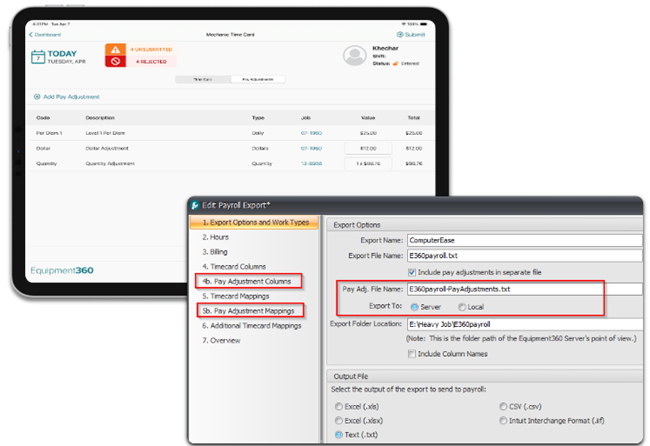
Last quarterly release, I shared with you guys, what we're working on with pay adjustments.
So again, as a refresher, this is gonna allow you to set up custom pay adjustment types in Equipment three sixty.
The intention is for this to be used for reimbursements with the time cards.
Most importantly, a solution for per diem, but we wanted to make this customizable in a way that you can configure this to work for whatever you need, including rig pay, other travel reimbursements, etcetera. So we will allow you to track daily, hourly, quantity, or dollar based adjustments, and you can set up each of those pay adjustment types. You can also override them at the employee level.
This is currently available in Equipment three sixty twenty twenty five dot five as far as the setup and being able to see it in the review time card screen. But, obviously, that's not the full picture. So what we are gonna be releasing this month is actually the mobile and the export to accounting sides of this story. So twenty twenty six dot o for both mobile and manager will be releasing in April.
Mobile side, as you can see there at the top, that is splitting the time card view into time card and pay adjustments. So you will have a new tab on mobile, when this releases.
Heads up on this, if you're not on a Equipment360 test flight, you can get access to this sooner. We will likely be pushing this, out to test flight within the next week, And if you'd like to join that, you can just hit your settings icon in e three sixty metal and press join beta program. You'll get an email on on how you can get that installed and start playing with it.
Bottom screenshot there, like I mentioned, the other other really big part of this story is how do I get that information out to my payroll system. So as you can see in here, this is our export to accounting wizard in Equipment three sixty. We've added some new steps and workflows to allow you to map and customize how you need those pay adjustments to go out to accounting, along with an option to actually split pay adjustments out into an entirely separate file.
Gonna kick it over to Chris here for a couple updates on telematics real quick, and I'll be back with you in a second.
Thanks, Hayden.
So a few updates in telematics this quarter. Big one is we integrated with Geotab. So similar to our Samsara integration last year, we can now pull in your Geotab information into HCSS Fleet and display that information throughout the HCSS ecosystem. This is live right now, actually, so if you're interested, you can go into the OEM providers page and activate that.
You can get in touch with our support team on the exact steps on how to do that.
Next is an update to our contacts, alert contacts flows, so a few things changed here.
Now that we have employee setups in telematics, we have added the ability to create a contact directly from that employee setup, so you no longer need to duplicate entry on creating an employee, then making a contact for them, and all of their information will sync across that contact. So their phone number, their email, if it ever changes, it'll update for their contact and they'll be able to get their alerts across.
This accompanied a pretty big change in the alerts contact page itself. So all the same information is available, but it's just a refreshed UI, a little bit more modern looking and usable.
The biggest change on this page is gonna be your contact method that updated. So in the past, we used to have you set up multiple contacts for different contact methods, so email or SMS. Now per subscribed alert, you can select your contact method if you want. In this case, for low battery, you wanna get an email, for the gas alert, I want a text, and for theft alerts, I only want a phone call, things like that. You're able to select that on a single contact setup per alert.
Then what the employees also enabled is shop notifications. So we added a few early on when we were working on MaintenancePro.
We've added now work order assignments. So when an employee gets assigned, in this case Hayden gets assigned to a work order, he'll get a text with the information from that work order when it was assigned to him and what equipment he needs to do and what service needs to be done.
And on that note, on the maintenance pro, I'm gonna pass it back to Hayden to talk about some of the stuff we did with fleet maintenance.
Thank you, Chris. A couple quick updates for you here on HCSS Fleet Maintenance, which is our web based equipment maintenance solution.
Big story and integration here, we've gotten heavy job safety inspection follow ups integrated with HTSS Fleet Maintenance.
So that'll allow you obviously to track those inspection follow ups, as your operators and users enter those inspections. We've got a little bit of an updated alert dashboard with a new tab to actually be able to add in I'm sorry, one to see and look at what the issue is. So you can see here in this GIF, we can go in, look directly at that form, we can see who reported it, we can see the job where it was reported, we can see the specific item that failed, and we have the option to quickly convert that into a work order as you're seeing here.
And a new section within the work order detail that contains all that information, including that that direct link to the form, the photos, our follow-up comments, etcetera, that will feed back into HCSS Safety.
In addition to that, we have added an expense entry workflow into our records. So this is just a simple part or vendor slash sublet expense entry and tracking system. So we can select an expense type into our description, reference number, date, the total cost of that expense entry. And obviously, we can drag and drop in our photos, invoice documents, PDFs, etcetera, and that will all be stored within our work order detail.
So short and sweet, we'll be on the lookout for questions. Chris and I will monitor that. If you have anything on the fleet side, please let us know. And I believe I am handing it off to Michaela here.
Yeah. Thanks, Hayden.
All right, guys, we're gonna talk about platform release and shift into some of the things that the team has been building.
First thing is we're gonna talk about Copilot.
Copilot can now read what is on your screen in real time, and I know that might sound like a small thing, but what actually means is that when you're in the middle of a workflow, Copilot understands the context of what you are working on. So you can ask it to summarize a report like you see here in the GIF. You can ask it to explain what a field means or have it walk you through a setting without ever leaving what you're doing. So there's no tab switching, no hunting through documentation, no stopping to go find an answer elsewhere or go ask someone, you just ask. And if you're staring at a pay item quantities report and you wanna know what you're looking at, As you type it in, Copilot already knows because it's also reading the same thing that you are.
So you can kind of think of it as a second set of eyes that's always with you inside the workflow. That's the experience we're going for, and we're really proud of where it landed.
Next up is safety permissions. Alongside what we're doing, we've made a meaningful update for how safety permissions are managed, and this one is gonna matter a lot for you credentials admins and IT admins on the call.
Previously, if you needed to manage safety access groups, you had to have a safety license and work across multiple modules to get that done.
That creates a lot of friction, double work, especially for people, credentials admins who don't have so we fixed that safety man permissions can now be managed directly inside http: so no safety license required, but from credentials, you can look up any users see what access group that they belong to view or update that groups permissions all in one place.
You can also search users, you can search for duplicate groups put in a quick summary without ever leaving that single screen so it's a lot cleaner a lot faster and it keeps those of you who are credentials admins in control without adding extra steps or having to pull in people who shouldn't be involved.
If you're interested in joining the beta program for this or giving us feedback, Rohan's contact information is on the screen. Please reach out to him, take a screenshot of it if you forget, and then we'll get you all set up. We'd love to have your feedback on it, what works, what doesn't.
And I think that's all for safety permission. So let's talk about insights. So if you don't have insights and you're on this call, shame on you because a majority of our customers are ticking up and your competition's got insights now. So before I get into what's new, I want to recognize where insights has come up till this day because growth here has been truly remarkable.
In the past year since insights went live, it has surpassed one thousand customers. We're actually at almost twelve hundred customers now, more than six thousand two hundred users, six seventy five active subscriptions. That means six seventy five of those twelve hundred companies are subscribed to at least one report that's being sent to their email, and nearly five thousand active reports across those twelve hundred companies. But the number the number I keep coming back to is this seventeen hundred hours of customer reports that have been generated. That's six months of work easily for our data analyst team that are working closely with customers, that are handing back to teams reports that they didn't have the staff to create manually, and so we did that for them.
That's the real story of insights. It's not just better visibility into your data, but it's actually the time returned to your teams who need it most, who need answers quickly. And we're gonna keep building on that. So let's talk about how we built on that.
Credentials data is now in I don't know why these slides keep skipping.
Credentials data is now in insights.
And we have a new report out there based on the credentials data. It's called the user access report. This one is specifically built for admins who need a complete picture of. Who has access to what within their organization, the report will give you information about user roles about product access about last login activity. So you're not having to piece this together from multiple places or guests we've also added a heavy job user permissions page that centralizes that access and permission level visibility. So you're not context switching just to answer basic access questions And because this kind of data is sensitive, access to these reports are restricted to users who have an admin role within credentials, so not just anyone can see this. Security and compliance is baked in by default into Insights.
Yeah. Another thing that we've done in Insights is something called the subscription admin page. So you saw six hundred and seventy five of those twelve hundred companies are sending reports to email, to different groups, and subscribing to reports. So if you manage subscriptions and insights, this one's gonna save you a real headache.
We have built a centralized admin page. So it's a single hub where you can manage all your insights report subscriptions in one place. So you don't have to think about, oh, did I I send this to this person? What's all my subscriptions?
And find these reports and figure out what you've done and what schedules you've on. Now you can see the full run history for any subscription report date, time, status, and whether a delivery succeeded or failed. If someone asks, you know, why didn't I get my Monday morning report? You can hop right in there and have the answer in about five seconds.
Insights admins get this company wide view across all their subscriptions, while standard users are going to see it for the reports that they have access to. It's kind of an administrative clarity. It sounds simple, but it makes a really big difference when you're managing a lot of report subscriptions for a lot of different teams.
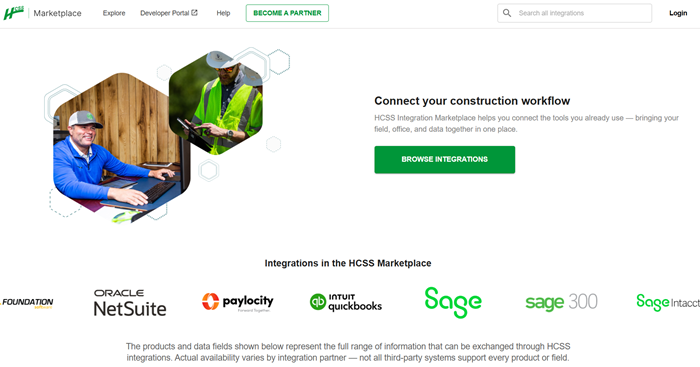
Alright. Finally, this is what I've been looking forward to talking about, and I'm gonna pause quite a bit in case there are questions here. The HCSS marketplace has gotten a facelift is too reductionist and it doesn't do it enough justice. It looks different, but it also functions different.
If you had seen our marketplace before or spent any time on it, you probably didn't spend very long on it.
That hopefully will change as we continue to offer more and better information. The previous marketplace had about seven integrations. We are live, I think this morning we have sixty, including the Geotab one that Hayden and Coco just mentioned. But I wanna give you a little context on why this feels a little bigger, like a bigger moment to us at HCSS than just a launch or facelift of a product.
HCSS is celebrating its fortieth anniversary this year. And in that time, we've always been very intentional about who we partner with and why.
We've never been interested in having the longest list, but we have been interested in having the right list for you.
And frankly, we've been curating very thoughtful, intentional partnerships long before quality over quantity is really even a thing in tech. So what you'll find at marketplace is close to sixty integrations, including, like I said, that Geotab integration, all spanning estimating equipment, field operations, your ERP, accounting, safety, payroll, BI tools, and a lot more. Every single integration in that marketplace has been reviewed upside down and backwards for not just whether it technically connects to our data, but whether it is a strategic technical quality fit and that the partners and the third parties are committed to supporting our customers as much as we are.
So when it is listed in our marketplace, we stand behind it. That's the standard we're going to hold ourselves to. You should check it out. There are detailed data maps.
There will be reviews coming out of each of these, there will be testimonials built in, there is detailed explanations on what they are, why we've built this connection.
We've also built this with the next few years in mind.
We hear more and more about AI in construction tech and in software and in our daily workflows. AI powered workflows, agentic APIs, agentic tools, real time job intelligence is not far off, it's here. And the integrations that your team invests in today is really gonna determine what is possible for your operation tomorrow. And so we have built this with the right foundation with that future in mind. So go take a look at marketplace. Httssapps dot com. Look at the products you already work in every day, see if you see some things you're trying to improve, some things you're trying to connect, and if you want to make sense, if you don't see something on there, I would I would encourage you to keep an eye on it because we're adding more every day.
You can go browse by products you're already using or by the workflow you're trying to improve and if you want to talk through what makes sense, specifically for your stack.
Your customer success person is the best place to start. But again, you can always reach out to me or anyone on the team and we'll get connected. We are very proud of what we built here and really just getting started. So that is all for me. I believe I'm gonna pass it back over to Reed to close this out.
Yeah, this is we do have a few minutes, so if you have any questions that weren't answered throughout the presentation, now is the time. Get those in and we can get those addressed.
We had a question from Danielle. Can you discuss further integration with BambooHR in the marketplace?
Yeah, absolutely. So if you go over to marketplace. HCSSapps and you look at BambooHR, you'll find more information than I could probably give you in a couple of minutes here, but it will show what information we're sending over. I believe we're only sending employees over right now.
All of these, the ERP and HR are currently one direction, they're pulling into HCSS from the third party. So in that case, it would be from BambooHR pulling employee data into HCSS.
But you could go find more on the marketplace if you're curious how to get this up and running, who to talk to about it, what data specifically is being sent over down to the object level. And if you have any questions beyond that, I'm happy to get you connected with someone that makes sense.
K. And then we have another question on integration between work orders and equipment three sixty telematics.
I don't know, Hayden or Chris or both, either you wanna address that question.
Yeah. I was typing an answer, but they are not integrated.
One is obviously an on premise desktop service.
One is a web based service. So they are they are not talking. The plan here is, obviously, we can deploy much faster on the web. And once there's enough value for you in the web, the idea is eventually we can start moving you over from equipment three sixty to fleet maintenance in the web. Obviously, we have a lot to develop there to get that feature set that you're gonna need to pull the trigger. But our plan is to have a migration path and a migration utility for you to move over to this new web based system.
But again, it's gonna take a lot of time. So it is not currently talking.
And then we have another question. Does about eight one one Spotter, does it take locate tickets and add to the job? I don't know if we have anyone on this call that can address that. Michaela posted the link to the marketplace.
But Yeah.
I can address it a little bit. To the I'm not sure if I have the answer to your question specifically, but I will say if you go to that link and you click the contact us button up in the right corner, you can ask the eight one one spotter team directly and they can tell you what the scope of the integration is. I browse through it real quick. I'm I'm not quite sure if there's an answer to that question specifically. I do know that it's reading heavy job job data, but I don't know if that functionality is supported, but they'd be able to tell you directly.
Alright. Another insights question. When will e three sixty tags be available to use in insights for filtering reports?
Is Harry on the call? He might be able to answer that one.
Yep.
So we don't have, like, an explicit plan for that right now.
But if me at harry dot y h c s s dot com, and I can oh.
We're losing Harry's connection dropping.
I put Harry's contact info as a response to that question, but he can be he can he can help you. It I I don't know if he was insinuating that maybe that is a functionality or is not, but, if you send him an email, he should be able to take a look at your particular instance.
Alright.
I think that is all the questions that we have today. Thank you everyone for joining us for our spring release webinar. As a reminder, the we do have one more question. As a reminder, all these in all this all these releases, unless otherwise noted, should be available on April sixteenth. So a week from today is when all the things we talked about should start showing up inside of the applications.
The only major change from that is the integration of plans and HCSS field into heavy job is coming one week after that, April twenty third. So thank you for joining us today. Of course, reach out to us at any time if you have any questions and we'll see you about three months for our summer release coming in June. Thank you very much.
Have a good one, everyone.