As we close out the year, we’re continuing to strengthen HeavyBid as the estimating engine at the center of your preconstruction workflows. The 2025.1 release focuses on three big themes:
- Tighter connections between HeavyBid and the rest of the HCSS Platform
- Better control and visibility into your production history and estimate data
- Quality-of-life improvements that make day-to-day estimating faster and easier
These updates are designed to help your teams move quickly, stay aligned, and bid with confidence while also laying more groundwork for a smarter, more connected HeavyBid experience in the future.
Big Stories & Key Takeaways
Stronger Integrations Across the HCSS Platform
A key focus of the 2025.1 release is strengthening HeavyBid’s integrations with other HCSS products so your data flows more seamlessly across preconstruction.
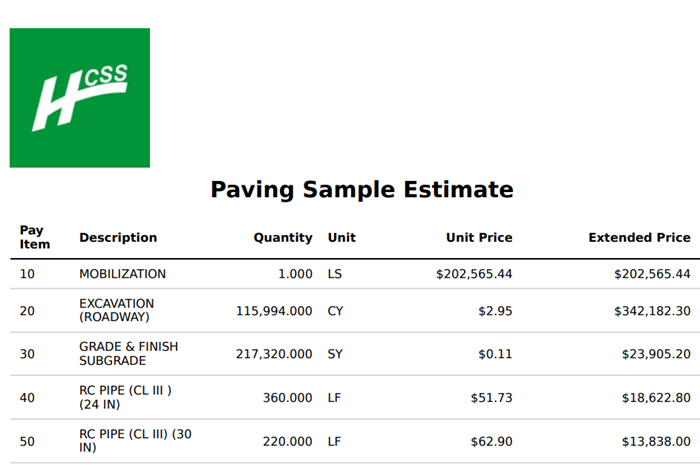
Generate a Basic Web Proposal (Phase One)
We’re integrating the new web-based proposal engine (part of the new web-based HeavyBid) with HeavyBid Desktop to modernize how you generate proposals.
- In this first phase, you can generate a basic proposal from HeavyBid Desktop using the new web-based proposal engine.
- Over time, this new experience will offer more features than the current desktop proposals, including enhanced, user-friendly customization options planned for Phase Two.
- When you launch a proposal, it opens in a separate browser tab, so you can access proposal functionality without needing to open HeavyBid Pre-Construction
This is a crucial first step toward a more flexible and modern proposal workflow.
Faster Bid Item Creation with Quick Price Sheet
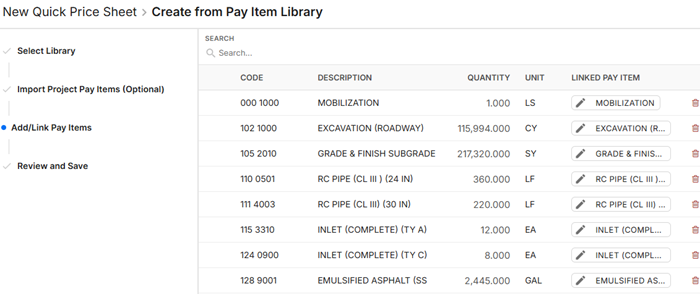
HeavyBid Desktop users with the paid version of HeavyBid Pre-Construction enabled can now tap into the Quick Price Sheet functionality from HeavyBid Pre-Construction to rapidly create new bid items and sync them back to the desktop estimate.
- Build new bid items using the Quick Price Sheet in HeavyBid Pre-Construction.
- Instantly sync those items into your HeavyBid Desktop estimate.
This connection streamlines estimate building, reduces manual entry, and helps your team move faster while maintaining data accuracy.
Autofilling Estimate Codes from Pre-Construction IDs
Estimate codes in HeavyBid Desktop now autofill from HeavyBid Pre-Construction Project IDs.
- This alignment strengthens the connection between desktop estimates and Pre-Construction projects.
- It sets the stage for better analysis and reporting across systems, enabling more informed, data-driven decisions in the future.
Cleaner Takeoffs with Clearer Project Context
We’ve improved the HeavyBid Desktop Takeoffs integration, making it easier to stay organized and confident that you’re working on the right project.
- The linked project name from HeavyBid Pre-Construction now displays directly on the Takeoffs screen in a clearer, more consistent way.
This small but important detail helps reduce confusion and keeps your teams aligned when working across multiple projects.
Improved Production History & Data Control
Accurate production history is critical for building precise bids and protecting margins. The 2025.1 release includes enhancements that give you more control over how production data is calculated and used.
Refined Production History Formula
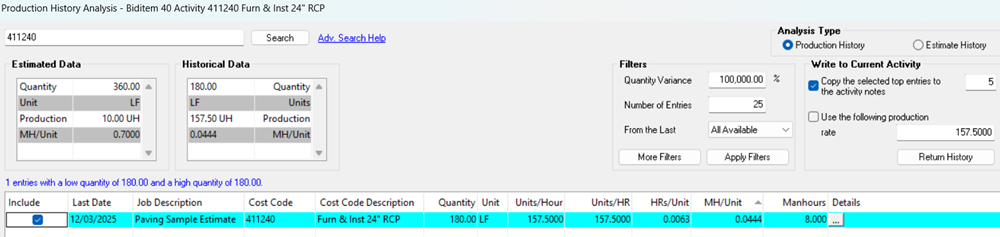
We’ve updated the production history formula to give you better control over what’s included in your calculations.
- A new filter enables you to exclude non-use hours (like rain delays or other downtime) from production calculations.
- This leads to more accurate readings of your true production rates, which you can rely on for future estimates.
View More Production Types in History Screens
You can now add additional production types as selectable columns in Production History and Estimate History.
- For example, if you built an activity in Units Per Hour, you can now also view it in Man Hours Per Unit.
This flexibility helps you analyze past work in the format that best matches how your team reviews productivity and labor usage.
More Control Over HeavyJob Desktop Export
You now have more granular control over what gets sent from HeavyBid to HeavyJob.
- A new optional checkbox lets you decide whether cost code estimate resources are included in the HeavyJob export.
- An example of how this is particularly useful is if you don’t want detailed estimate resources to influence foreman costing in the field.
This update gives your team more control over project-level data flow and helps ensure better alignment between office assumptions and field execution.
Quality-of-Life Improvements in HeavyBid Desktop
We’ve also delivered a set of targeted usability improvements to make everyday estimating smoother.
Longer Activity Descriptions in Quick Sub Material Entry
- Activity descriptions in Quick Sub Material Entry now support up to 100 characters, giving you more room to capture clear, descriptive detail.
Simplified Feedback Submission
The previous Ideas Portal used for submitting feedback has been retired.
- You can now submit product feedback directly through the Contact HCSS section in the upper toolbar of HeavyBid Desktop.
This brings feedback closer to where you work every day, making it easier for your team to share ideas and requests with us.
Looking Ahead: The Future of HeavyBid
HeavyBid Beta – Preparing for 2026
The basic version of the new web-based HeavyBid is now live, and our Beta program continues to expand as we work with customers to build out the advanced version.
- The web-based HeavyBid is a key step toward a unified, cloud-connected estimating experience, allowing you to create estimates anytime, anywhere.
- We’ll continue iterating with Beta users to ensure the advanced version supports the complex needs of civil and infrastructure estimating.
Stay tuned as we share more milestones throughout 2026.
Classic ETA Sunset Reminder – HeavyBid 2026.0
As a reminder:
- The “HeavyJob and Accounting (Classic)” Export Subsystem (Classic ETA) will be sunset in 2026 with the release of HeavyBid 2026.0.
We strongly encourage customers to adopt the latest export and integration options to stay ahead, ensure compatibility, and take full advantage of the connected capabilities across the HCSS Platform.
If you’d like help planning your transition, evaluating the new features, or connecting HeavyBid more tightly with HeavyBid Pre-Construction and HeavyJob, please reach out to your HCSS team.
All right, let's kick it off. I know everyone's busy. It's the end of the year. So here we go. Well, good afternoon, everyone, and thank you for joining our last Estimated Webinar of the Year. I can't believe I'm saying that and it's already December. If this is your first time attending one of these webinars, welcome. We put these sessions on exclusively for our estimating customers. So they're designed to help you guys understand how to get the most out of our estimating products you purchased. Also, it gives you a chance to see a live view of any new releases or improvements we've made. And then most importantly, it gives you the opportunity to ask questions directly to our product team. So, of course, as a reminder, we do have our incredible support team. They're here twenty fourseven for you guys. So, you can call them anytime but we love using this time and format to walk you through things live and give you a chance to ask questions live. So, alright. Before we get started, let's start with some introductions. My name is Melissa Teague and I'm the product marketing manager for estimating products, so heavy bid and heavy bid preconstruction. And as a product marketing manager, I work closely with our product team and customers, so you all, to help shape what we talk about and how we talk about our products and develop resources that help you get the most out of the software you already own. And that includes things like webinars like this, release notes, videos, and other materials that make it easier for you to learn what's new and apply it to your day to day work. So I will kick it off to Aaron. All right, welcome back everybody. If this is the first time hearing from me, my name is Aaron Alsos. I'm technical product manager for for HeavyBid Desktop. Like I said, I a lot of names on this list are are pretty familiar. So, I've spoken with a lot of you. If if you haven't, you'll see a slide later in the presentation. It's got my contact information. It's Aaron, A A R O N, .allshaushaushcss dot com. Do not hesitate to shoot me an email. I love chatting with everybody. So if you have questions, comments, concerns, don't hesitate to reach out to me. All right. Melissa, would you go to the next slide, please? All right. So what Melissa kind of shed some light on. This is the what's new. This is where I'm going show you kind of the new functions and features, at least the highlights of what came out in HeavyBid two thousand and twenty five point one. And then we're gonna share a glimpse into the road map for HeavyBid twenty twenty six. Basically, spend a few minutes talking about some of the new functions and features we're gonna bring into HeavyBid twenty twenty six. We're going to give a quick blurb on how to access the free version of HCSS Preconstruction. And then with whatever time permitting that we have left, we'll open the door to Q and A. Now that's just general Q and A. If you have questions, do not hesitate to use the chat panel, ask any questions. I've got the chat up, but if I miss it, Melissa's also got it pulled up and she'll stop me to ask those questions. So without further ado, let's jump right into it. HeavyBid Desktop two thousand twenty five point one release. Next slide, please. The overall theme of HeavyBid two thousand and twenty five point one was how do we better integrate HeavyBid with our other HCSS products? So that's precon, that's heavy job, that's safety, everything within the HCSS ecosystem. How do we integrate better? And that's ranging from something as simple as just updating some of our back end APIs that the end user might not see, but it creates efficiency improvements. Two, UI and workflow improvements, which we're going to demonstrate here in the webinar. So if we go to the next slide, we'll talk about the first one that we're taking a look at. And the first one is quick pricing integration. So if you are a precon user, wonderful. If you're not, this might be a reason to actually start thinking about using it. Quick pricing integration. What is it? It's essentially a new green sheet. It's your go no go decision. It allows you to quickly grab the average price of your your bid giving you a ballpark of what your bid's going to be prior to ever creating an activity or a bid item within heavy bid. Now, in the past, we used the the average price from our pay item library or from estimate history. What we're doing now is if I went through the trouble of doing that in the quick price sheet, I had then go back and repeat the steps of importing it into HeavyBid Desktop. Well, we have simplified that process and that is allowing you to not have to continually redundantly enter that information. You set it up once in quick pricing and then when you create the bid from the project, that information automatically gets brought into your estimate. Melissa, next slide, please. Alright. The next one is straight from customer feedback. This is something that a lot of y'all have asked for in the past. And that is for anyone using the full featured version of precon that is tying the precon ID to the estimate code. So what that means is that when I am creating an estimate from my precon project, the estimate code automatically fills in with the precon ID that creates that link and that creates that association with the precon project from the heavy bid desktop side allowing for easier remembering of what estimate is tied to what project in precon and will further drive analysis in the future. Next slide, please. This is a pretty big one here. Something that Paul Lambert and his team have been working on for months and months and months at this point. And that is a brand new proposal engine. And when I say new, I mean, from the from the ground up, this was made from scratch over the over the last year. And the idea here is to give all of the same functionality that you get in, say, a heavy bid word bid proposal, but with much greater flexibility and much greater ease of use. One of the caveats of the word bid proposal is there's a lot of functionality there, but it can also be confusing to users who are not Microsoft Word proficient. The idea here is to make that functionality significantly easier to use. One of the big pieces that is what I consider a huge win is with the integration, way we were able to write it, as Paul and his team continue to pump out new functionality into the proposal engine, it will automatically become available for the paid users of Precon. And we're going to show what you get right out of the box, and then we're going to give a real quick sneak peek at the unfinished version of what phase two will give you as far as being able to put in your logos and and things like that. But again, the idea here is that you will have a single source where you can create all all of your proposals, all of your templates with much greater customizability than what you currently have in HeavyBid Desktop. Erin, I'm just going to we have one quick question for the previous release, the quick pricing. They want to know for the quick bid item pricing based on estimate data, has there been any effort to link DOT average unit price data? So for, like, DOTs that make that information publicly available. Yeah. So not to create the live link, that is something that we are actively working on creating a partnership for, but we have not solidified that yet. But we can take that average unit price, plug it in to the PayAdam library, and sync that information up to get that average price. But we do not have a live link with some of the DOTs just yet, but we are actively working on it. Thanks, Aaron. And one last question. So can you have heavy bid reference a field other than precon ID? For instance, they use the precon ID for all projects, but when they go to actually bid, they create another number under a different field. So that would be the field that they want HeavyBid to reference for auto filling the big the bid number. Is that a just out of curiosity, is that a custom field that you added in precon? Okay. Yeah. Adding a custom field is definitely a trickier task as we we don't know right out of the gate what it what it is. So creating that live link is slightly harder to do, but it is something that we have not ruled out. All right, thank you. Okay. So moving right along, the next phase, both of these items that we're going be taking a look at come straight from user feedback. And that is improvements to production and estimate history analysis. If we go to the next slide, please. The first thing we want to look at is the ability to filter your production history analysis hours based on non use codes that you set up in HeavyJob. So what we've done is we've taken the information that Heavy Job currently had available, which is the ability to exclude the non use hours, rain delays. You'll notice in the screenshot just a random non use tag and be able to filter those hours out of your productivity calculations. And you can filter based on whatever non use codes that you deem as appropriate. And we'll jump into the software here after the presentation and actually walk you through that. But that was straight from you all. The next piece of that is also within production history. And that is, if you go to the next slide, please. That is having the ability to see your production information based on more than one specific production type. So historically, what we've done is the looking at the historical information out of heavy job, we always convert that information to whatever the productivity type is within the estimate, whatever you're comparing it against. Well, one of the great feedback items that we got was the way that it's being estimated and the way that somebody might be looking at production history analysis, they might not be looking at apples to apples in the sense that while I might have estimated a units per hour, for whatever reason, I might always look at an hours per unit. I need to be able to see it without having to do the mental math of converting that information on the fly. I want to be able to just look at the screen and see what that conversion automatically is. So within the analysis view, we are going to, we give you the ability to see that additional, those additional productivity types. So you'll see here, we've got units per hour, hours per unit, man hours per unit. The different productivity categories giving you that greater flexibility. And then last but not least, we have a few small quality of life improvements. These aren't necessarily big splash items, but they will go towards making your lives a little bit easier from the estimating perspective. So if you jump to the next slide here. Alright, first one, enhanced activity descriptions. This was brought up in might have actually been town hall last year, that when you're working with quick sub material entry and you're specifying an activity description, we had not updated that to be in line with increased activity description link that we actually have in the tree. Once upon a time, it was limited to forty characters. Well, QuickSub material entry, we hadn't updated it to be the new one hundred character link that we allow in the tree. Now they're in sync, and they both show one hundred characters. So if you use Quick Submaterial entry and you specify your activity description, this is a great tool and a great addition for you to have. Next item is something that has been asked over the last couple of years, and that is greater granularity of what data you're sending from heavy bid to heavy job. And the item is estimate resources that get sent over to heavy job. We've had a lot of users in the past that have requested the ability to exclude that information from being sent over to heavy job. They don't necessarily want their foreman potentially being confused by how the estimator built the built the job. They just want to be able to see what the targeted production quantity is. As always, updates to DOT integration, we always do our best to try and stay up to date as best we can with changes to DOT. Sometimes we don't find out about those changes until after the fact. And that was the case with the Ohio sequence number digit change. In this case, we were able to get a fix out almost immediately. And in this case, under the import and export from DOT, you'll see a new entity, and that is EBSOH for the Ohio DOT customers. At some point earlier this year, they changed the sequence numbers from four digits to five digits. Well, we had the original template hard coded to four characters to read it properly. We had to add another one to account for those five characters. Better display for takeoff screen. So this one, really simple. When they are looking at the takeoff information in heavy bid, they had no idea what project that takeoff information was linked to. So if they had to go and update the takeoff, they didn't know what project to go and look at. We added the project name right at the top, and we'll take a look at that here as well, making it very easy to see what project this takeoff information is associated with. And then the ability to submit feedback within heavy bid desktop. So for anyone unfamiliar, the the ideas portal that we used to submit information for, it either has or is in the process of being sunset. So with that being said, we needed a better way for y'all to be able to submit feedback, good, bad, indifferent that comes directly to me so I can see it. Well, we put that information right into heavy bid, and we'll show you how to access that as well. You can put in any kind of feedback you want. And again, it goes directly to me. Alright, with that said, I'm going to steal the screen here and we're going to jump into heavy bid. We'll see how all of this plays a part. So the first thing we're going to do here is we're going to share this screen. All right. So we're taking a look at we're going to start in the project detail in precon. Why are we looking at that? Because we're looking at the quick price sheet. The first item we talked about is being able to integrate quick pricing information into your heavy bid estimates. So how have we done that? Well, in the project detail, you'll see I have a quick price sheet. I've got fourteen pay items totaling about just shy of two million dollars I also have my precon ID December webinar one. Excuse me. Those two pieces are going to play a critical role in the estimate when I go and build it. So with that being said, let's jump right into heavy bid. We're going to File New Estimate from Project Tracking. Once I'm in my new estimate for Project Tracking, I get a list of all of my projects. And in this case, I'm going to look at my December webinar. I'll click next here and my estimate code is automatically filled in with my precon ID. I get my estimate name. Again, I can click next and I get my source assessment information. This is where I can pick my master. And I'm going to click Finish. At this point, I'm going to get one additional pop up because I have that Quick Price Sheet. And it's going to say Build Activities Using Code Book. Well, why is that? Well, in Quick Pricing, we don't have the activities associated with it. We're simply just looking at the average unit price. So I'm going to pick my code book that I want to build the activities off of from that quick price sheet. So selecting my code book entity, and I'm going to click my build button. Again, we make the backup. And in this case, I created twenty nine activities. If I go in here, I see my bid items, and I can expand it, and I can see all of my activities. All of that information automatically built out for me. Again, I didn't have to do an important heavy bid. All that information was already up in precon, saving you that redundant information. Well, one of the questions that comes up is, what if I added quick pricing after I created the bid? Is there a way to get that information in the heavy bid? The answer to that is absolutely. So for Graham's here, I'm going go ahead and I'm going to actually erase this estimate. Right. Not sure off the top of head that is the case, but we'll go ahead and we'll do it the old fashioned way and just delete them all. So I'll select everything and we will delete it. All right, everything's gone. Okay, we'll run summary and spread. But now if I go to bid item setup, I can go into my import bid items. And I now have a new option here. I have an option for quick pricing. When I select quick pricing, you'll notice my pay items automatically populate from my quick price list because this estimate is tied to a precon project. Again, I get to choose am I going to populate my activities? And when I select that, again, get the same twenty nine activities added. I jump back to my tree view. And again, my bid items and my activities are brought back. All right. Any questions on on that particular piece of the puzzle? Okay. Now one of the other things I want to jump into is HeavyJob. We talked about being able to use non use codes in production history. Just in case there's anybody on this call that does not use production history, production history pulls live data from HeavyJob. So if you use HeavyJob, you have access to this. There's no additional cost with this. It's part of your subscription. And you'll notice I created a sample time card here with a non use code in this case. I created this webinar non use tag. Real simple. And again, I applied a non use tag to my equipment. So I have one for labor, have one for equipment. So for this, we're going to jump back into heavy bed. And I'm going to go to furnish and install twenty four inches RCP. We're going to go up to our binoculars button. And we're going to take a look at production history. And in this case, I'm going to expand my filter. And I get that option again. This is from that that job from the time card I made yesterday. I have my paving, paving sample estimate. And in this case, have eight man hours. You'll notice there's a new button down on the bottom that's non use hours filter. If I select that, we make a call directly to heavy job to pull a list of all of the non use. You'll notice I've got some duplicates in here because kind of comes with the job I have a bunch of junk data in there. But for the purposes of this demonstration, I'm going to go ahead and I'm going to exempt. I'm going to filter out my labor non use hour tag of Z. So I go ahead, click Okay. And you'll notice my man hours changed, but you'll also notice my man hours per unit, my hours per unit, my units per hour, they all adjusted. And again, it changed from eight to four based on that time card. I've got four regular hours and four non use hours. If I want to jump into the estimate, or if I want to jump into that job, I can go into my details. And anytime I'm in a webinar, this always wants to take a long time. Even though I demo it right before and it works just fine. It's just the way it works. We'll give that a minute to populate, but you'll notice when you look at the time card information and you look at the labor and equipment on that time card, you'll see the non use hours or you'll see the hours adjust as well for those non use filters. Everything is updated as far as hours are concerned to account for those non use hour filters giving you just that much greater precision when you are looking at the historical production rate. So now when you are actually applying that into your estimate, you get much greater control and much greater accuracy into what that production rate is being, what that production rate is, and what is being applied to that estimate. All right. The next item that I want to take a look at Aaron someone called out on the screen shown the units MH look off. Not sure what that's referring to but. It's looking I'm assuming the the units of man hour. Okay. Okay. Yeah, I'm assuming this. I will confirm. I'll double check. Forgive me, I don't remember the exact formula off the top of my head. But they should all be correct. But if there is an issue, I'll go back. I'll double check on the formula. But if there's an issue with the formula, we'll go ahead and we'll, we'll get that corrected. All One of the other items that we took a look at here is Jeff, let me do a little digging on that and I will get back to you. Alright. Take a look at what is next, and that is given the ability to look at additional units of information. So if I go ahead, I can add and remove any additional productivity categories. In this case, man hours per unit, whatever the case is. But in the past, if we were looking at units per shift, we gave you units per shift. Now you still get units per shift, but you can also get man hours per unit, units per hour. We'll take, basically, so you can look at what makes sense to you from a productivity type. Any questions on being able to choose additional categories? Alright. Moving right along and that is looking at the new proposal. So if I jump up to my summary menu, you'll notice right here under the bid proposal, I have a brand new option for bid proposal. If I select that, it's going to make a call right up to the new proposal engine. In this case, under the template, I have two options here just because I have access to unreleased functionality. But what you get out of the gate is the concise bid proposal. That is designed to mimic what you get with the concise bid proposal. But if you are a paid pre con user, you will get access to the additional functionality as it is released. In this case, you get two very simple options. Do I want to include the date? And do I want to have page numbers if there are multiple pages? And I can go ahead print that. And my proposal will automatically generate. In this case, it mimics again the concise bid proposal. But as I go through and I want to look at any of my newer proposal templates, I can go ahead print that. And if I want my logo in there or anything like that, I can go ahead. You'll notice the text is a little bit different. I've gone through and I have changed all of that information. So all, everything within the proposal is going to be modifiable. And you get to customize this to whatever makes sense for you and your company. And again, it pulls right from that new proposal engine. And as those new functions and features are released, it is made directly available to you. Taking a look at a couple of those those new new functions right away. If I go into quick sub material entry, what we were talking about, being able to add those additional resource or those additional text fields. I'm sorry, text length. If I go in, go add to multiple bid items, I'm going to select a bid item ten and I'm going to specify my activity code description. Again, we updated that to be one hundred characters, and you'll see now the activity description is one hundred characters versus the forty that it was before. Real simple, real easy, but for those users that make use of this functionality, should make life a lot easier as far as setting your activity description. Taking a look at exporting to heavy job and accounting, being able to export or not export the estimate resources. If I jump over to export to heavy job, you'll notice there is a brand new button right here in the middle screen. It is export estimate detail. Exporting estimate detail controls whether or not the estimate notes make it over into the cost code notes for your time cards and foreman out in the field. One of the other changes is in the import and export from DOT. Again, under the DOT entity, if I scroll down to EBS Oh, this is the new the new Ashtoware template to control where the sequence number is five characters long versus four characters long. If you are running into an issue where not everything We had a question. Should it not be named Export Estimates Notes? Export. No, it gives, when you look at estimate notes, gives you the ability to see the detail on that particular item. So if I go in and I look at this particular item, if I jump into it, it's going to show you this bit of information. So it shows you the activity, quantity, description, and it shows you the pieces and what is actually being included on that particular activity. So not cost, but it gives you quantities and resources that are on it. So in this case, estimate notes and resources, it's always been referred to as estimate detail. That is definitely something we can refer. We can see how that is received and potentially make that text change on the next release. All right. Trying to remember if I missed anything. Did I miss anything on that? Oh, yes. Takeoffs and feedback. So within the takeoffs, very straightforward. If I go to my link to takeoff screen, I don't necessarily need to have a takeoff added, but you'll see here right at the very top, I have the name of the project added right there on the top of the screen. So I can very quickly jump back to precon and reference what project is associated with this. When you're exporting to heavy job, how do you check boxes to export certain resources? So in this case, I can choose whether or not to export my material, sub and expense list. So this is my material and subcontract list. I can choose whether or not to export the entirety of that list. Only if I am doing cost code or resource extractions can I control whether or not I am exporting one particular resource or not? And that's just whether or not I'm extracting it. But that's in tandem with exporting material subcontract expense list. But the last item I want to address here is the feedback. To access the feedback, if I go up to help and I go to, under Contact HCSS, I go to Submit Feedback, it's going to automatically open up a new window for me. And it's going to bring up this little pop up for me. And it's, what problem are you trying to solve? It's just a general question. If it's feedback in any way, shape, or form, I can go ahead, fill that information out. Is it about heavy bid? Is it about you can you can select what product category is it? Is it about precon or is it about heavy bid? And then how important is it? Is it a nice to have function or is it a must have feature? Again, I get that information. And if it's something that I need additional information on or I want to follow-up with you, I get your contact info and I can follow-up with you right away. In the export to heavy job and accounting classic, I get to choose under my heavy job options. So that is this functionality export estimate details and what you are referring to This activity notes. So this activity notes is separate from the estimate detail functionality. This is the actual notes that are included on the activity. So what I mean by that is in the tree, we'll close that. What I'm talking about is this note field right here. That's controlling whether or not to export this information. And that is available in the Classic. So next question is, when will twenty five point one be available? Twenty five point one will be in general release, which means that you all will receive notifications that it's released next Tuesday, December ninth. All right. Now with that being said, we're gonna go ahead. We're gonna jump back. So in the export to heavy job and accounting, so if I go to exchange export to heavy job and accounting and under the cost budget if I jump down to export to heavy job, this is where I can choose whether or not to export estimate detail. Mike noted. I I see you on that. Alright. Jumping back right into the webinar here, I want to take a look and show you what we have planned for twenty twenty six. So with twenty twenty six, we have a few items that we are covering. First one is expanding estimate entry to three decimal places. What does that mean? Well, in the case of what drove this conversation is Florida DOT. Florida DOT and their pay items are actually extending the values or the quantities out to three decimal places. If you've used heavy bid in the past, we only support up to two decimal places at the pay item number. That's just not enough granularity for Florida DOT. So we need to go in and we need to update HeavyBid for that. That is actually a pretty massive undertaking because more or less anything that feeds off of the pay item number has to be updated to accept those three decimal places, as well as the the screens that are associated with those. Next item we're gonna be looking at is using the Attachments API in HeavyBid Desktop. The Attachments API essentially gives me the ability to sync my attachments into the cloud. Now, what does that do? A, it creates redundancy. It gives you a source of backup for it, but it's also driving that connection with all of the other HCSS products. If I sync that estimate up and I have those documents attached, when I'm in my precon project, I'll see those attached right there in the precon project as well with information about where they're where they're coming from, like what pay item or what bid item, what activity, what estimate that information or those documents are linked to. So plans, specs, takeoff information, whatever the case is, I can attach it and then have it sync back up. Eventually that information will follow along through the rest of the job cycle. Those documents will be on the heavy job side. Under document management, they'll be in plans under the document management section. Again, moving all the way around so that I can set them up once and have them follow me through the entire cycle. The next item we're looking at is estimate history sync and access changes. So this is a fairly comprehensive overhaul of how we're handling estimate history. What do I mean by that? Well, for our new customers, we're actually going to enable estimate history by default. So when you are going into an estimate and you create a new estimate, we're going to be syncing that estimate right out of the gate. Why are we doing that? It's to create that redundancy for you. And it's to be able to go into precon and have that information already available for you without having to go through and do a bunch of set ups. The next item that we're looking at is with those synced estimates. Right now that estimate is synced up, but we have to have a better way for you to retrieve that information and create copies of estimates based on that synced estimate data. So we're going to go in within this managed synced estimate information, we're going to give you the ability to go ahead and make copies of those estimates. And then last but not least, all of that drives into the emergency standalone. If you've ever been in a situation where you need an emergency standalone, your home server goes down, you're off grid for whatever reason, you don't have access to your local network. You need the ability to grab that information that you have synced and archived so that you can continue working on it when you need to. In this case, we're going to make that process a whole lot easier with your emergency standalones because they're going to be tied to your multi user system, allowing you to see those synced estimates and retrieve them when needed. Versus having to make a backup locally and transfer it over via thumb drive or email the way you currently need to. And then last but not least, we've said this the last couple of years at UGM, we've said it in other webinars, we've sent marketing material on it. In heavy bid twenty twenty six, we will be sunsetting the classic export to accounting. If you are still using the classic export to accounting, you should be being contacted by support. If you have not, please reach out to support to get migrated so that whatever you are using to export from HeavyBid to your accounting system, we can make sure that that is replicated in the new export to accounting and you will have no issues moving forward. Alright. Jumping right along. Precon plus heavy bid. That is the way that we are gonna be moving forward in the heavy bid life cycle. Precon is your your go no go. It's your project management. It's your bid board. It allows you to determine where I'm bidding, what I'm bidding, how much I'm bidding, and the status of those projects. Are they won? Are they in progress? Did we lose them? And allow you to run analysis on that information. It gives you better insights into where I want to target, what locations I want to target, what types of jobs I want to target, and make better informed decisions around what to actually go after. It's also much more customizable, allowing me to basically design that project detail the way that I want with the information that is relevant to me. It's not going to have a bunch of information that I will never fill out. It's tailor made to you specifically. Now, how do we get started? Call support. If you're in this webinar, you're on maintenance, you get access to our twenty fourseven three sixty five support. One-eight fifty five-two thirty one-seven thousand eight hundred seventy six or supporthcss dot com. Tell them I want to get started on precon. They'll go through, they'll get it turned on for your company. They'll make sure that your user accounts have access to precon the way that it needs to be. And it's a few five, six minute phone call. It's very straightforward, very easy. And again, there's no additional cost to get started with precon. Now, once you're in precon, how do I actually figure out how to use it? Well, HCSS Academy has dozens and dozens of videos on how to use precon and get started. That's ranging from how to set up a project to setting up the integration between HeavyBid and Precon, as well as going over all of the functionality of the Precon suite. The other avenue, support. Support is very well versed in how Precon works as well as the integration between Precon and HeavyBid and they'd be happy to get you squared away. Alright. Last but not least, we have UGM right around the corner. UGM is coming out January twentieth through the twenty second. If you have not already signed up, please scan the QR code. Go ahead and get signed up so that you can come in, see us in person, ask whatever questions you want, as well as attend some of the great courses that we offer on how to better make use of your system. Or if you're curious about any of our other products, you can attend those classes and see what those products have to offer. All right. With that being said, does anyone have any questions, comments, concerns? I'll give it a minute here and Alright. Someone is asking, they said I never called in for the heavy job integration are you still taking calls for that? Yes Mike I will shoot you an email after this webinar and we'll get something scheduled. How and where can subs send in their bids? Alright. So we've got two questions here. If it isn't already, when will the course info be finalized? I brought that one up first because it's probably a quicker answer. The course info should be finalized. It should already be on the UGM registration page when you're registering for classes. That information should be available already. If not, shoot me a shoot me an email, and I can give you the info on any of the at least heavy bid courses. All right, I'm going to drop the agenda. It looks like they are up in the chat for anyone that needs it. Okay. So the next question was how and where can subs send in their bids? A little off topic. That is something that we are that we are actively working on for use for other subs to be able to send bids in. It's something that we took a stab at a couple of years ago, and the overall feedback that we got was basically the subs wouldn't use what we had built. So we are trying some other approaches in that. We don't have, I don't have any additional info on that particular topic but it's not something that we have abandoned completely. The the short and sweet it is right now, if they send you in something whether it's PDF, Excel, you can import it via Excel or you can hand key in those prices into your quote system. The precon that is free with heavy bid is a limited version of precon till you subscribe to the full version. That is absolutely correct. The the free version gives you access to a number of functions and features. The full version basically gives you additional customizability options. It gives you additional templates that you can save as well as access to some of the additional functions and features in precon. When is the look of heavy bit going to change via the update? I heard from other users from last year's user, UGM that the Windows look was changing. So I want to add a little clarity on this. The look of HeavyBid Desktop is not changing. However, we have recently released a new web version of HeavyBid. That is giving a whole new UI, whole new perspective into HeavyBid. And we can give a nice sneak peek of that right now. And that is under the estimate side here. Within the estimate, you'll notice here we still have a tree. Everything kind of still looks the way that it always has. But under each information, I have my crew, I have my productivity, I have my rate. In this case, if I change my rate to let's see what I have. Five units per shift. Everything calculates. The the big deals here that you're going to see there's no need for on prem hardware. There's no need for a server. Everything is web based. You as long as you have an internet connection, you have access to it. Everything calculated in live time. I don't need to go in and run summary and spread. I can see everything that's happening in live time. I also get access to all of my pricing information right here on the screen. So again, I get my cost, my markup and my price right at the pay item level. I can also go as far as to have markup applied at the individual resource level so I can get as granular as I want with my markups. I can go all the way down to the resource level of detail. HeavyBid was built with an audit trail first mindset. So what do I mean by that? Every single keystroke in HeavyBid is tracked. That gives me the ability to make changes and see every single change that was done. Another fun function and feature, something that I know a few people have been asking for is, if I go in here and I make a change, and I don't like that change, I can come in here. I can undo that change. In this case, naturally, because I'm in the webinar, it doesn't want to work. But I promise you it does work. We have an undo and redo option in HeavyBid, giving you that ability that I know a lot of you all have asked for, along with a plethora of new functions and features that we simply don't have on the desktop side of things. That, excuse me, is in a soft release status. Over the next calendar year, we will be building the migration pipeline allowing our desktop users to make that migration or run-in hybrid status between running in desktop and running on the the web based version. Now what does that mean for HeavyBid Desktop? Means nothing. HeavyBid Desktop's not going away anytime soon. So if that's a a big concern of yours, I wouldn't even I wouldn't worry about it. We have no plans to sunset heavy bit desktop for a for a number of number of years. Will the web version have a dark mode? I love that you said that because Melissa can attest to this. I've been pitching dark mode since for at least two years now. It's one of those things that I wanna do, but we just haven't had the the available time to do it. But if I have any say in it, we will absolutely have a dark mode. Import into subquote from an Excel document feels unusable as it opens temporary Excel files for each line item in the back end. When importing quotes with hundreds of lines, this can this can take considerable time to have Excel open and performance functions. I agree with you. It is for small quotes, it works fine. But for the larger quotes where you have hundreds of line items, it is not the most user friendly item in the world and that's why we have not given up on improving that functionality. Is there a calculate button or does it do it automatically anytime you change, update the estimate? Every single function that you do in HeavyBid, it'll automatically recalculate for you. In private work, some pay items are taxable and some are tax free. Is there a way to define pay items as non taxable or is it still a parameter that is set for the entire job? So in this case, I'm going to assume that we are probably talking about Washington DOT items being taxable and non taxable. And in that case, under bid item setup, if I go to the customize tab here, let's see, do I have it? Yeah. So where's my taxable? Yeah. I have a taxable column here and I can choose to have that as taxable and I can put that percent of what of what that bid item is and when I run the customized proposal in HeavyBid Desktop, it will print those tax values at the bottom of the bid. Is that also for cloud desktop users? Forgive me. I do not know what that is referring to. I think it's the dark mode, Erin. But correct me if I'm wrong. Who asked the question? I think it's for the dark mode. Is it for cloud desktop users as well? While we wait for that confirmation. Okay, the look changing. So that is a brand new product that will run-in parallel with HeavyBid Desktop. So that is whether you are HCSS cloud hosted or not, eventually you will have the option of whether or not you want to migrate or you want the ability to run-in parallel. It does not it does not make a difference whether you are self hosted or cloud hosted. And then yes, please dark mode. Yes. I want dark mode just as bad as you do. All right, we have about three minutes left enough for probably about one or two last questions. Another vote for Doc Moad. I like it. Keep them coming. Absolutely and as we mentioned in case anyone didn't get it here. If you have questions, here's my email. Don't hesitate to reach out. I'm happy to answer any questions. We got one last question. I don't know if you saw that. Will there be any functionality in increasing the size look of HeavyBin? The desktop version really kills our eyesight. Right now, it's not necessarily in the pipeline, but Mike, when we when we chat about exporting the HeavyJob, we can chat about this as well and get a get an idea of what you have in mind. All right. I'm not seeing any additional, excuse me, any additional questions come in. So I'll, at this time, I'll let everybody go. Again, if you have any questions, don't hesitate to shoot me an email. But with that said, have a great rest of your day. And if I don't hear from you, enjoy the rest of your year. Bye, everyone.