Good morning. Welcome to this this look at HCSS Safety. My name is Gaston, and I'm the senior technical product manager for HCSS Safety. And with me, I have Robert, and I'll let Robert introduce himself.
Yeah. Nice to see everyone virtually. My name is Robert Pennington. I'm the solution engineering manager over here at HCSS.
Awesome. So and you can't see her, but in the background, we also have Brooke here who didn't want me to call her out, but I'm recognizing her anyway. She's gonna be here kinda answering some questions in chat for you guys. You feel free to throw those out there, and we wanna make sure we catch all of the all of the questions that you have as we're going through. So feel free to throw them out.
They're not an interruption. We'd love to see those come in.
Okay. So today, we know that all of you on this call are gonna be doing work or already doing work to protect your people, to protect your equipment.
You have a safety culture. You care about your crews. You wanna keep everyone safe. But the question I wanna answer today is, is your documentation working as hard as you are? So if your safety forms are just sitting in a file cabinet, a POS paper, or in some generic cloud drive, then they're just records. And I wanna show you how HCSS Safety can turn that documentation into active data, helping you spot trends, protect your employees, and extend the life of your fleet as well.
So just as a quick over over overview of the agenda, we're gonna talk about what we think is an important safety challenge, which is we wanna show you how to how your data can move beyond being that digital filing cabinet or even maybe a paper filing cabinet and connect it across your daily workflows, help you catch incorrect issues before they become actual critical failures.
And I'm gonna give you a just a bird's eye big picture overview of the entire HCSS safety ecosystem, everything from how we're working to help protect your people, to protect your equipment. And then we're gonna dive into a real world example, specifically on our equipment inspection workflow. Let you see how that would how that would work and how we imagine it it looks in practice to go beyond to this digital filing cabinet.
And we're gonna save plenty of time at the end. So if you have questions, if things pop up, you see thing on the screen that we didn't we didn't click on it, we didn't dive into it, we're gonna save time at the end for questions, and you can also be sending those questions in throughout if you like via chat.
Okay. So let's look at this kind of bird's eye view of safety first.
Before I before I dive right into safety though, I do wanna mention we're not gonna go into a lot of detail about this today, but it's worth noting that HCSS safety does not live in a vacuum. It's part of a larger platform of software, and it ranges from solutions for estimating operations, fleet, all kinds of things, and and safety fits in with all of that.
But looking specifically at safety, let's start with kind of a bigger picture of safety. Safety is not meant to be just a form builder. It's meant to be a big data engine for you.
So coming through the system right now, annually, we tend to see about one and a half million inspections, over two million safety meetings. But the most important number on this slide full of statistics, I think, is the three hundred and eighty thousand issues flagged. So this represents three hundred and eighty thousand times a worker found a hazard, could be a frayed wire, a trench issue, broken step, and documented it so that it could be fixed.
And that's a big difference between filing a form and preventing an incident.
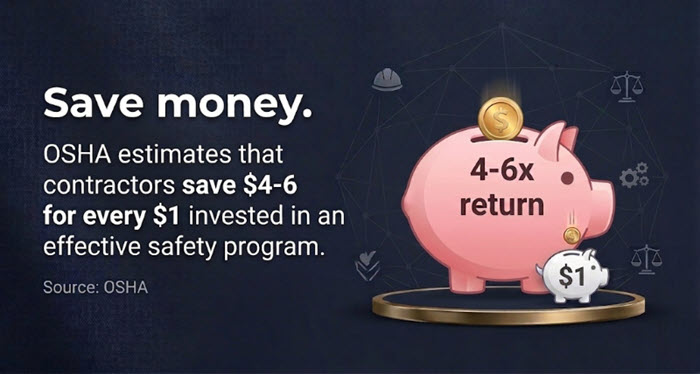
And to that end, OSHA estimates that somewhere between four and six dollars return is you get a four to six dollar return for every dollar invested in an effective safety program. And one of our customers told us, for example, that they lowered their EMR from one point one five to point six eight or another from point nine seven to point six four, all within a short time of adopting HCSS Safety. So that we think that that is a that insurance that whenever you document these efforts digitally, whenever you're able to take action from your data, that that really does pay off whenever it comes to lowering your insurance premiums as well.
Okay. So let's just take a very quick look at some of the the modules and capabilities of HSS Safety. It's worth noting that it is a field first safety management system. So we recognize that one of the hurdles of implementing a a system like this, of getting your documentation, is actually getting it recorded.
So if you're doing all of the right things in the field, but none of it's getting documented, then it's not going far enough. Right? You're not able to take action with data. You don't have data to analyze, and you don't have proof of the good things that you're doing.
So we we try to focus first on making sure that the field is able to get their work done as far as their digital paperwork as easily as possible. We really want to reduce the burden on people in the field whenever doing all of that digital paperwork.
So when it comes to the actual paperwork, digital paperwork that can get filled out, we have things like meetings. Right?
Taking care of your safety meetings.
This is a great way to communicate important lessons back out to the field. You can take your trends, your near misses, failed inspections, or any other focus topics that you wanna talk about. You can schedule those out for your field to to see in the crew as toolbox talks.
We've heard feedback from some customers that doing this digitally save their form in about ten minutes every morning. They didn't have to go through a binder. They just had the relevant topic right there on their iPad. They take all their signatures digitally and they're able to get to work.
And then the next one we'll take a look at, just as a brief overview, would be our job hazard analysis.
So this is where while while things like inspections will catch issues with equipment or issues on the job site. The JHA hazard analysis or pre job briefing or tail board or whatever it is you guys might call it helps ensure that your crew has a safe plan before they even start the work.
So one of our customers told me that they use this as their tool to break what they call the, vicious cycle of rushing. Their safety director told us that without a daily plan, crews often scramble to find tools or materials, and that leads to shortcuts, that leads to accidents. But by requiring a digital JHA, they're able to identify gaps before work begins, and that helps ensure everybody gets home safely.
So I'm not gonna go super in-depth into inspections yet.
I'll mention that oops. That is not the button that I meant to click.
So we're about to dive into a a real like, a real inspection workflow in-depth, so I'm not gonna go too much into that. But we definitely have inspections. I'm gonna get more in-depth in that here in just a second.
What I would like to mention is observations.
So observations are a great way to catch things before they become incidents. It's a tool that gets to be put right in the hands of every person whether actually, they work for you or not who's out in the field. You can even put a QR code out there, put it on a sign, someone can scan it, and they can submit an observation about something that they noticed on the job site.
And you can get get alerts on that and make sure that you're able to see exactly you're able to then take action as appropriate in a timely manner.
K. And then next, I'll mention our near miss module. So near misses is a way to let you document your close calls. One of our customers, they actually call these their safety shares. So if a crew nearly backs a loader into a trench, for example, they snap a photo, they share a fleet wide, it turns what could be a scary moment or probably was a scary moment into a learning opportunity for every other operator in the company. And it helps prevent that mistake from being repeated elsewhere.
And then we also have our skills and certifications tracking. I can show you this more live here in a second, but just know that protecting people really starts with competency. So one of the questions you can answer with our skills and certifications module is, does the person operating this dozer actually know how to run it, for example? And I'm gonna mention this a little bit more when we dive into our inspections workflow because it it becomes relevant there actually.
But so you can you can track their certifications and training instantly. You can do a quick scan of a QR code to pull up those certifications. One of our customers actually prints out these QR codes, sticks them on hard hats. And then when a supervisor, inspector, whoever it might be, wants to check out an operator and make sure they're certified to run the equipment they're running and that nothing has expired, then they can just do a real quick scan from any mobile device with a camera, and they can they can check that right on the spot.
And before we dive into I keep clicking the little wrong button. I should have made my screen a little bigger.
It's worth noting that I we understand that creating meeting topics, JHAs, inspections, all of that from scratch can be really time consuming. So we provide a library of over two thousand industry standard forms, everything from army core HAs, inspections for cranes, all all different types of equipment. And you can pull up those templates. You can grab them, use them, pick which ones you want cherry pick, customize them to your heart's content, and then just basically remove some of that administrative friction so that people can focus on getting their paperwork done and not actually creating the paperwork forms themselves.
So whenever we're looking I'm gonna switch over to our software here.
Some other pieces that I'd like to call out right before we dive into our inspections workflow would be actually, here I have it over here. Would be our dashboard. This is our our the website of our software. We have a website and a mobile site. On the website, the dashboard is basically a bird's eye view for you.
If you're using things on paper, you have to wait until you can get that piece of paper to review in order to figure out what's going on on the job site. But with HSS Safety, you're gonna see it all live. It's gonna be coming in here on the dashboard. One of our customers who one of our safety directors for one of our customers, he says he manages jobs across about thirty different states. And so this dashboard is a really quick way for him to audit his his job site paperwork and make sure everything is getting in as it's supposed to and help him look for issues.
Watch for gaps. Another screen that I like to call out in brief would be our outstanding items screen. This is where any any issue that's raised from things like inspections, incidents, observations, you can have all of your failed items show up here so that you can take action on them. You can assign them out for people to take care of. You can track their status. You can leave comments and see a history of those comments, and you can jump over and view the full inspection, view the full history of corrective actions, all of that here from outstanding items. You can see how long something has been open, how long it's been since someone has actually modified it so you can see that there's actually action taken place.
And we're gonna dive into this one a little more in a second as well, but you can see when it was sent to the shop as well. So if you're using our our fleet management solution, then you can see if something has been sent to the shop manager as a notification, as an alert.
Alright. So I've been jumping through real quick.
Robert, we're about to I'm about to jump into our inspection workflow. Anything that I missed that you wanna call out real quick before I dive into that?
Not that I can think of. There's been some questions in the chat I've been answering as we go along. Okay.
Awesome. I have nothing to read. Questions. So if you need to stop me for anything, let me know.
I'm just gonna dive into the inspection workflow, and we're gonna take a a good look at that. And then, my aim is to be done in time to give us a a good solid ten minutes to continue answering questions as well. Click around. We'll show you whatever you want.
Everything is here live, ready to go. So alright. I'm gonna jump over to our field system here for a second.
And actually, I wanna show you a different app here.
So whenever it comes whenever it comes to inspections, I think we wanna start imagine here we're gonna do an equipment inspection. And really everything tends to start with the operator. We actually have this app called MyField that you can put directly in the hands of your operators, and it puts inspections right in their hands. By the way, they can also do things like check their own skills and certifications, make sure nothing's expired so that whenever someone does come up and scan and verify, they have already self verified that everything is up to date. And they can be a little more proactive in making sure their their own skills and certifications are taken care of. They can clock in submit hours. We're not gonna go into any of that right now.
The main thing I wanna focus on is this app can be on their phone, on, you know, Android, iOS, whatever, and they can just quickly grab their inspection. And whenever they tap on inspections, one of the cool things about it is you'll notice that at the top is there's an add inspection button. We can see things that were scheduled that were overdue, but I wanna call attention to the scan QR code button right here.
And here, let me see. I I'm obviously sitting in my office, not in front of a piece of equipment. But if you imagine that there's a QR code printed out or or we've had people that engrave them on little metal stamps and and put them on their pieces of equipment. Imagine you have this QR code. I'm just gonna scan it here on my screen, probably, if I can do it right.
There we go.
Whenever I scan that QR code, it automatically picks the correct piece of equipment.
It grabs it it knows what job I'm on, and it actually grabbed the correct inspection form for this equipment, which I set that up right I accidentally closed it a second ago. But we actually have an equipment list here in the system where I can go in and actually, was a roller, I think.
And I can go in and I can actually assign the correct inspections to my pieces of equipment so that people aren't having to go and scroll and find a, the correct equipment number or b, the correct inspection for that equipment. It's all linked to make life really, really simple for that person out in the field who's who's grabbing that equipment or who's doing that equipment inspection. So that's, say, from an operator perspective.
I also just wanna point out that from, say, more the the crew leader perspective, if they're here in a time card, they can do things like check the operator, make sure that they have the correct skills and certifications ready to go. They can tap on that piece of equipment. They can say, hey, look. It's missing an inspection.
And they can just tap add inspection, and it will also go automatically pick the correct piece of equipment, the correct inspection. It'll grab hour and meter readings, all of that sort of thing, assuming they're available.
And another thing that I want to point out is you can actually pick the location.
You'll note here it says at the top that I can enable location services.
I turned that off because all that's gonna show right now is is my office, not the actual job site. But, you can actually use location services to have it a shortcut and show it right where someone is standing whenever they're doing this inspection. But I'm just gonna pick where I believe this piece of equipment is, which is somewhere around here.
And now I've recorded where that location is, which is gonna be important here in just a minute.
Okay. So now just moving through. I am gonna go ahead and fail an item.
And let's say that it's frayed hydraulics.
But it's still working.
Alright. So this is this is a warning sign. Right? And you notice that there is a notify shop toggle. This is what will send an an alert over to your shop manager if they're using one of our fleet solutions.
And I'm just gonna take a blank photo because I don't actually have the equipment in front of me, but we're just gonna show that you can take a photo here.
And we're gonna say that everything else on this inspection passed.
I'm gonna sign it. I'll put my name to it here.
Alright. It's not my real signature, but there you go.
And we're gonna send this thing in.
Okay. Now that that is sent in, we're gonna see a few things happen.
A, we're gonna see that over on our fleet side, they're gonna get an alert so they can create a work order, assign a mechanic.
We're gonna see that over here on a map, that inspection is also going to show up.
Hey. I got really close to picking the right spot for that equipment. Here's that piece of equipment. This is actually the GPS data for that equipment and where it is. And then here's the inspection that I just performed on that equipment.
I can see the photos. I can view the actual inspection item. I can click and open it up. I can go read through it, see everything that happened with it, see the notes.
I can go in and open up a follow-up view so that I can add additional notes, etcetera.
And I can assign this out, whatever that might be. And one of the cool things about this this kind of multi oh, and also, I should mention this too.
I also can see here for anyone who has the the mobile app, then they're gonna see this failed inspection item here on their open follow-up screen for that job site. And so one of the cool things that can happen here is now a mechanic or someone can be assigned. They have a photo, so they're gonna save time. Before they even go out to the job site, they have a photo.
They know exactly what's wrong. They can grab exactly the right parts, build the right right hose, whatever it is they need to do. And they can go out to that job site, and one of our customers reported they they tend to cut their repair times for these in the field repairs in half because they're not having to go out, do an assessment, go back, get the parts, and then go back out to the job site again. And we'll go even further to say that if they have access to this list of open items on their screen or to this map view where they can then look at, say, all inspections that have failed on this job site, they can go check and see, is there anything else that I need to take care of while I'm out here?
And it can save quite a bit of time.
So now I'll also mention that these kinds of failed items also end up in our reports. We have analytics that show what kinds of things are failing. You can assign leading indicator categories to all of your items in your inspections and start tracking trends over time so that you can see if there are other decisions you need to make. But, the main thing I wanted to really focus in on is you can take this piece of what would just be a piece of paper, and you can turn this into something that's really actionable and that saves you a lot of time and helps prevent that equipment from breaking down.
Okay. I think that's it for the the details I was gonna show there.
Robert, if you have anything you wanna add, please do. I like I said, I haven't been personally looking at the questions, but I'm sure there are plenty that we should look at.
Yes. There's a couple things I'll call out. One is there's a question about do we have the ability to create forms from scratch? You can.
So that's something that if you wanna take our templates and modify, you can. But you can also just build your own as you see fit. And lastly, the inspections. If there's a failure, you can get an immediate text and or email as well.
Everything we've shown here for the inspections is part of HSS Safety. There's been some questions about how that works with our asset management software Equipment360. There are some tie ins where you can have them send over to the shops, they can turn into work orders, but that's just an additional tie in. That's the core stuff we're looking at here as part of safety. And then one last question came in here if this can integrate with other platforms. So we do have a way to connect to your data here. If you're using Power BI or something, you can just wire that up directly and pull this into your own reporting.
And then if you're talking about, like, syncing things like employees and equipment or by projects, we have ways to to pull that stuff over as well.
So if I missed anything or or misread your question, feel free to put a follow-up there.
And I was trying to click around here as you were talking, show things like here's here's where you can set up alerts.
One notable thing is, say, you want people to be able to get alerts about certain inspection types. You know, maybe there's someone in the shop and you just wanna make sure they get your equipment inspection failed items. You can easily go set that up. Tell them just the failed items so they're not getting the noise of all the past ones as well. Which if you if you do want it, you can get an alert for every inspection pass or fail as well. But and we have we have alerts set up for multiple of our modules where we think that the alert could help you take quicker action. We have those set up.
What are our next questions?
Or what else would you guys like to see? I can click around wherever you like right here.
Inspect let's see. I see one about showing when a meeting or inspection is overdue.
So let let's look here.
So whenever I'm here in the inspections module, for one, you can see there's a set of overdue inspections. So these were scheduled over here in our scheduling module here on the manager side, which I'll let that load and I'll come back to it. So you can see here it shows that these are overdue. We also do put I don't know if I have them set up here to show.
So you notice how this time card here has a one unsent underneath? We put a very similar warning underneath certain items whenever needed based on the job and and whatever criteria everything is set up for.
Will will show that there's, say, a meeting that's not yet sent or things like that.
Alright. Robert, I know you've been paying a little closer attention to me. Is there one that you'd like to grab out and talk through?
Yes.
There's a couple. One is question of if I'm a GC and have a ton of subs, they all need their own HSS accounts to submit digital forms. What we've looked at today is a requires an account.
We do have a component that is you can upload and create your own forms that don't have the the follow ups or anything else, and those allow you to give, a QR code to someone and or a link, and they can fill out forms without needing an account. It's a slightly different workflow, not so much follow-up, but if you're just trying to get information in, that would work. There's another question of show us how to create a work order from an inspection. The work order creation piece is pretty firmly within our asset management piece, which I think is a little bit out of scope of of this meeting. I'll put a link to some documentation on that if you're curious, and we're happy to show you that full workflow on a separate call. I think that would be a little bit outside of of what we can do here today. And then the there's some questions around how accounts and users work.
It is a a per user basis is is how the cost works for it.
And for the creating your own form, you don't have to work with our IT team to get a query for your reports. We'll automatically the way we have our data set up is that your questions and everything will load in, and Gaston is opening up insights right now, it looks like, which has some of that advanced reporting functionality.
Yeah. For when it comes to the reporting, it kinda depends on where where we're looking at actually creating this form. But like, say for the inspection forms, if you go into this setup here and you create an inspection, then the items are going to roll into our analytics reports automatically. And for broader, like, cross platform reporting, we we have this analytics. Those of you who are familiar with Power BI may find this user interface very, very familiar because it is powered by Power BI.
But your data across the entire platform is available here.
So and we have a lot of prebuilt reports. You can go in here and you can click this edit button if you assuming, you know, permissions, yada yada yada. You can go in and just kinda grab whatever data across the entire HSS platform and pull it in, correlate it however it needs to be done so that you can you can see what's going on with your data. And all of your especially things like inspection forms, you know, we we have a lot of that we'll just automatically plug in as soon as you make that edit.
Okay. So JHAs it says, are JHAs more user input or prepopulated tasks and hazards? And do the safety shares automatically go to every other user? Okay.
So a couple of things to unpack here. For JHAs, we kind of let you choose a little bit how you like that to work. So you can go into JHAs and you can set up a library of the types of activities that you do organized by category. And you can then go in and set up, say, these preset steps, hazards, controls.
If you're needing to use the RAC, then the risk assessment code, then you can also populate that. And so you can prefill things, and then whenever they open them up on the field side which let me go open that here. Oops.
Then those can be prepopulated whenever they're selected as well.
You also, though, could choose to for for some reason, every time my tablet is connected to display, it just goes really slow.
You also can choose, to fill out a JHA from scratch in the field, and it's basically just an empty form.
You can choose to copy a previous JHA. So say I've gone out there in the morning and or or maybe even before people have worked, and I'm going to, you know, kinda prepopulate this job specific this job specific JHA, then I can do that.
And then whenever once I have that filled out, I can simply do a copy previous and find one of those previous entries, make a copy, edit as needed, and submit it as a new entry whenever I need to. And that way, it lets things kind of evolve as it goes.
And for safety shares, I think I had mentioned one of our customers calls their near misses a safety share.
That does not necessarily automatically go out, but you could you could choose to send that out. I'm sorry. I know I'm running right up at the end of time here, but is there anything else that we wanna cover in our last few seconds?
There's one more question about a worker matrix application, be able to track worker specific violations and issues. If you're talking about the like a failed inspection or a failed item by the reporter, yes, that's in there by default. I can look at all of those. If you're talking about, like, a specific violation of I saw this person do this, you could build that report in Insights, but it's not something that is natively in the the system. It'd require building it out.
Ryan, I think we're probably at time.
We could answer questions all day, be happy to do that, but If you have any further questions, feel free to drop your virtual business card or reach out to our speakers with their information on their panel on the tile and come back at eleven thirty five for our next demo.
And thank you so much for being with us today. Let us know if you have any further questions.