
It’s a new year! And with it comes new product updates for the #1 construction management software. This quarter’s improvements are all about momentum. Whether it's HeavyJob, HeavyBid, or HCSS Fleet — we're starting the year off right with smooth navigation, clearer insights, and expanded mobile functionality that keeps execution locked in from shovels in the ground to the chairs in the office.
Big Stories & Key Takeaways for HCSS
- Branding Updates to Reflect a Unified Platform Experience
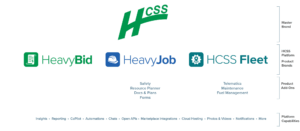
This quarter, HCSS introduced minor branding and UI updates to reflect our evolution toward a more seamless, unified platform experience. You’ll notice this most clearly in the top-left navigation, where apps are now organized under three core product brands: HeavyBid, HeavyJob, and HCSS Fleet. This change better reflects how you already work across the platform and makes it easier to navigate related tools. Alongside this update, we made small interface refinements to improve clarity and reduce visual clutter, while keeping familiar workflows exactly where you expect them.
What's changed?
- Logos in the top-left navigation now reflect HeavyBid, HeavyJob, or HCSS Fleet.
- Plans, Safety, Forms, and myField are now grouped under the HeavyJob brand.
- Plans is now Docs & Plans to better reflect our growing management capabilities.
What's staying the same
- These desktop and legacy brands will remain in use, but are not considered part of the unified HCSS platform.

Big Stories & Key Takeaways in HeavyJob
Safety Incidents and Plans Data Incorporated into Map View
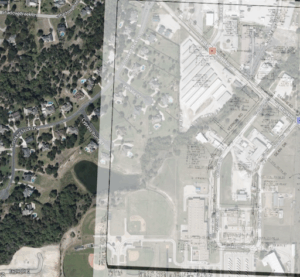
Our newest feature, Map View, just keeps getting better. We’re bringing together more data from across the HCSS platform to give you a full look at your projects. Foremen and crews can now see safety incidents and inspections directly on the map. No need to jump between plan sets and map view.
What this means for you: Gain visual context without switching tools and make faster decisions.
NEW Resource Planner Features Integrate into HCSS Field and SMS Messaging
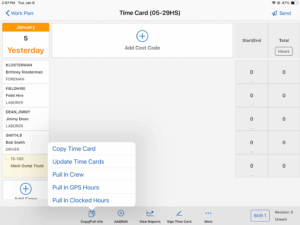
Resource Planner is already showing off its newest features with integrations into HeavyJob. You can now see labor and equipment schedules directly in the field, gaining a clear view of who’s on site and what’s coming up in the days and weeks ahead.
Also, get a head start on timecards by pulling crews and equipment straight from Resource Planner. Use text or email to quickly communicate changes in job details, location, and foreman assignments.
What this means for you: Stay more prepared and cut any last-minute surprises. Keep your schedules clean and accurate, so your crews stay informed.
 For a full recap of the HeavyJob updates, watch our latest webinar to see everything in action!
Big Stories & Key Takeaways in HeavyBid
Maintain Estimate History (HeavyBid Pre-Construction)
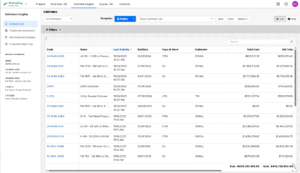
Managing which estimates should (and shouldn’t) count toward your reports just got a lot faster. We’ve introduced Bulk Actions under Estimate Insights, so you can include or exclude multiple estimates at once instead of clicking through them one by one.
This new workflow mirrors the familiar “Select All” experience from the Project List. Simply filter your estimates (for example, all estimates with zero cost), hit Select All, and choose Exclude. In just a few clicks, you can clean up thousands of estimates and ensure only active, relevant work is driving your key metrics and dashboards.
What this means for you: Instead of manual cleanup, mass updates happen in seconds (not hours). Gain more confidence in your insights with cleaner, more accurate reporting across large estimate datasets.
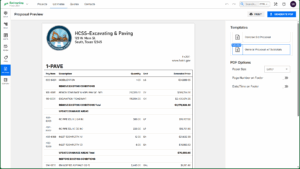
- Add Subtotals on a proposal (HeavyBid)
You can now group pay items into subtotal sections within your bid proposal, such as phase totals or area-based totals, without affecting your final bid total.
What this means for you: You get clearer, more professional proposals without changing the final bid total or creating extra work for yourself.
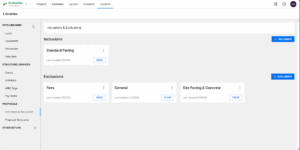
Introducing Inclusions and Exclusions Library (HeavyBid)
You can now create standardized lists of Inclusions and Exclusions in your HeavyBid library and quickly pull them into any local estimate. Once added, these lists can be edited within the estimate.
What this means for you: Save time by starting from a consistent baseline every time while still having the flexibility to adjust the scope for each job.
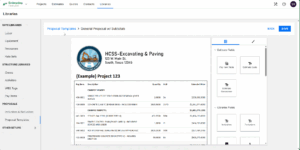
Proposal Template Designer (HeavyBid)
HeavyBid now has additional customization options with the drag-and-drop designer. now makes it easier to build cleaner, more professional proposals by letting you drag and drop estimating and pre-construction fields directly into your templates. You control what shows up and how it looks, while everything stays connected to real-time estimate data.
What this means for you: Save time by creating templates that can be reused. Arrange and style your information once, and it will show for each unique bid in seconds.
 For a full recap of all the HeavyBid updates, watch our latest webinar and see everything in action!
Big Stories & Key Takeaways in HCSS Fleet
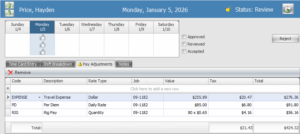
- Pay adjustments in Equipment360
More fleet tracking, better visibility. You can now account for per diem, rig pay, travel expenses, and other pay adjustments directly in Equipment360. Adjustments can be tracked daily, hourly, by quantity, or by dollar amount, with employee-specific overrides when needed. Configuration is available now in version 2025.5, with mobile support and export to accounting rolling out by the end of January 2026.
What this means for you: Save payroll time with fewer surprise costs and track how work actually gets done in the field.
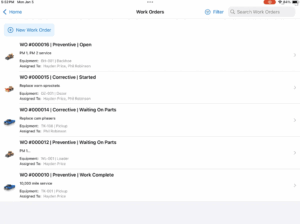
- HCSS Fleet Maintenance with Mobile Work Orders
Work orders are now fully manageable from an iPhone or iPad using the HCSS Fleet mobile app. Create and edit work orders, attach PM services and maintenance requests, assign mechanics, log repair notes, and keep all related documents in one place.
What this means for you: Stay accurate and save time with real-time equipment documentation, straight from the field.
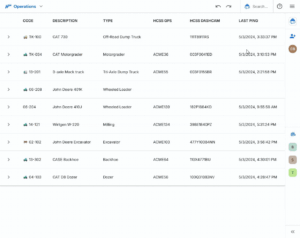
- Expanded HCSS Fleet Telematics integration: SiteWatch
Work orders are now fully manageable from an iPhone or iPad using the HCSS Fleet mobile app. Create and edit work orders, attach PM services and maintenance requests, assign mechanics, log repair notes, and keep all related documents in one place.
What this means for you: Stay accurate and save time with real-time equipment documentation, straight from the field.

 For a full recap of the HCSS Fleet updates, watch our latest webinar to see everything in action!
Big Stories and Key Takeaways in Data & Reporting
- AI Copilot search
This quarter introduces the first iteration of in-context AI inside HCSS. Copilot can now summarize the Daily Digest, help you quickly find HCSS pages, and answer questions as you work. You can also drag and resize Copilot so it fits naturally into your workflow instead of getting in the way.
What this means for you: Save more time getting the answers you need and less time searching for them.
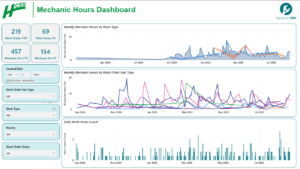
- Equipment360 data in HCSS Insights
Insights now runs on a new Equipment360 data model that no longer depends on a reporting database. It goes live on January 26, 2026, and launches with three new templated reports built on this model. (Reminder: You’ll need to be on Equipment360 version 2025.5 to use it.)
What this means for you:Access your data faster and feel more confident in your reporting and decision-making.
Stay Connected, Stay Profitable
This 2026 Winter Product Release is about tightening the connections across the platform and getting rid of the friction that slows teams down. With clearer insight and smoother handoffs, your teams can move faster, stay aligned, and kick off the new year with confidence!
Want to see the updates in action? Book a demo today!