Apart from being frustratingly tedious, manual entry is expensive. A few spreadsheet errors and misplaced dozers — you’ve got yourself a laundry list of rework.
At HCSS, we've always believed that fleet managers shouldn't have to chase down numbers across half a dozen systems just to know what their equipment is doing. Hours, mileage, and maintenance status should be available the moment they happen…not entered by hand at the end of a long day.
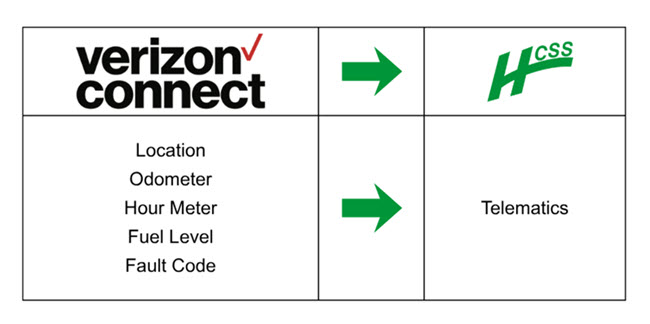
That's the thinking behind our new integration with Verizon Connect, now live in our integration marketplace. As fleet operating costs continue to climb, this partnership routes telematics data directly into HCSS Fleet, cutting out the busywork standing between your team and a clear operational picture.
This new integration replaces the guesswork with dependable, automated workflows that you can use to manage your entire fleet. What does this mean in simple terms? Tighter control, sharper visibility, and fewer hours lost to unplanned equipment downtime.
About Verizon Connect
Verizon Connect is a global provider of transportation, video, and asset-tracking technology built to take the guesswork out of fleet operations. Their platform continuously captures equipment hours, mileage, and other core usage data.
Exactly the details most prone to getting lost, delayed, or mistyped under a manual workflow.
At their core, they offer telematics hardware that connects to vehicles and equipment to continuously capture data like location, equipment hours, mileage, idle time, and engine diagnostics. That data feeds into a centralized dashboard where fleet managers can track utilization, monitor driver behavior, and stay ahead of maintenance needs — turning information that used to live in scattered logs and spreadsheets into a single, reliable source of truth.
That data now flows straight from Verizon Connect's dashboards into the HCSS platform, with nothing extra required on your end.
What Does This Mean for HCSS Users?
Once your fleet is connected through Verizon Connect, every truck, crane, dozer, and piece of tracked equipment becomes a known quantity instead of a guess. Here's what changes:
Manual entry is too costly.
Equipment hours and mileage update on their own. No spreadsheets, no double-checking, no Friday-afternoon scramble to reconcile numbers.
It’s called preventive maintenance for a reason.
Usage data flowing in automatically helps surface maintenance needs early, before they turn into costly downtime.
Every asset lives in one place.
Vehicles tracked through Verizon Connect show up alongside your OEM-connected and HCSS-tracked equipment in a single, unified view.
Faster data. Faster decisions.
With cleaner data feeding your reports, job costing tightens up and surprises in your margins become far less common.
"Verizon Connect helps bridge the gap between field operations and fleet management by automatically delivering critical vehicle insights into HCSS Fleet. With accurate usage data and proactive maintenance visibility, teams can reduce administrative effort while significantly improving operational decisions."
— Phil Robinson, Group Product Manager, HCSS Fleet
Verizon Connect and the HCSS Platform
As with other seamless integrations within HCSS, there’s no need to stitch together separate systems just to get a complete picture of your fleet. With this integration, your Verizon Connect data sits directly inside HCSS — right next to your estimating, field data, and broader fleet operations. Forget about switching through multiple tabs and manual input. Just one workflow that mirrors how your jobsite actually runs.
Here’s a simple setup for customers: Connect your account through the OEM Providers section within HCSS Fleet | Telematics, and start putting Verizon Connect data to work right away. The integration is available now to all HCSS Fleet customers. Learn more at help.hcss.com.
Want to see the integration in action?
Book a demo and watch how telematics data flows into HCSS Fleet, how maintenance alerts trigger automatically, and how it all ties back to your jobs. All without extra spreadsheets (or monitors) required.